
Speed to Lead: What It Is, How to Measure It and How to Get Faster
Speed to lead is how fast a person replies to a new inquiry. How to measure yours, a 5-minute target, reply templates and the setup that keeps it fast.
Key takeaways
- Speed to lead is the time between a customer contacting your business and a real person on your team replying with something useful.
- A practical target for a local service business is a reply within five minutes in business hours and first thing the next morning for overnight leads.
- Measure the median reply time and the share of leads answered within an hour, not the average, and count leads that never got a reply as misses.
- An automatic acknowledgment buys time but isn't a reply: the clock stops only when a person answers the customer's question.
- Google's Local Services Ads help page lists responsiveness to customer inquiries as a ranking factor and says missed calls may hurt it.
On this page
Speed to lead is the time between a customer reaching out to your business and a real person on your team replying. For a local service business, aim to reply within five minutes during business hours and first thing the next morning for anything that arrives overnight, with an instant automatic acknowledgment in between.
That's the whole idea. The rest of this page is how to measure yours honestly, why it matters more for a plumber or a med spa than for a software company, and the setup that keeps it fast when you're busy doing the actual work.
What speed to lead means for a service business
Most articles about speed to lead are written for sales teams with a row of reps waiting at desks. Your situation is different. The person who should answer the lead is often the same person who is under a sink, on a ladder or in the middle of a client's appointment.
So a useful definition has three parts:
- The clock starts when the inquiry arrives: a form submitted, a chat started, a booking request, a text to your business number, a Facebook lead ad filled in.
- The clock stops when a person replies with something useful: an answer, a question that moves the job forward, or a time to talk. An automatic "thanks, we got your message" doesn't count. It's a holding message, not a reply.
- You measure the typical case, not the best one. One lead answered in 30 seconds doesn't make up for three that waited until tomorrow.
You'll also see it called lead response time or time to first response. Same thing.
Why speed to lead matters
People who need a service usually contact more than one business at once. Whoever answers first gets the first real conversation, the first chance to give a price, and often the job. Every hour after that, the customer is talking to someone else.
This isn't a new finding. Research published in Harvard Business Review in 2011 (opens in a new tab) audited how companies handled online inquiries and concluded that most were not responding nearly fast enough. It's been quoted ever since, along with a pile of percentages you'll see on vendor blogs. Many of those numbers come from older studies of business-to-business sales teams and get repeated without a source, so we won't stack them up here. The direction is clear and doesn't need decoration: faster replies win more of the leads you already paid for.
For local businesses there's a second reason, straight from Google. If you run Local Services Ads, Google's own help page on ad rankings (opens in a new tab) lists "your responsiveness to customer inquiries and requests" among the factors in how likely your ad is to result in a lead, and says missed calls may hurt it. Slow replies can cost you the lead in front of you and the next ones too.
How to measure your speed to lead
You can't fix a number you don't have. Here's a simple way to get one this week, with or without software.
- List last month's inquiries. Every form, chat, booking request, text and lead ad from the past 30 days. Leave out existing customers asking about an existing job.
- Write two times next to each: when it arrived and when a person first replied. If nobody replied, write "no reply". That's the most important line on the sheet.
- Take the median, not the average. Sort the reply times and take the middle one. One lead that waited three days over a holiday weekend will wreck an average and tell you nothing.
- Count the share answered within an hour. Divide the leads with a reply inside 60 minutes by all leads. Count "no reply" as a miss.
- Split by when they arrived. Business hours versus evenings and weekends. Most businesses are fine at 11 am on a Tuesday and slow everywhere else.
A good first target: a median under 15 minutes during business hours, at least 80% answered within an hour, and zero leads with no reply at all. Then push the median toward five minutes.
A worked example
Here's an example to make the numbers concrete. A house cleaning company gets 40 inquiries in a month. The owner checks the sheet and finds:
| Business hours | Evenings and weekends | |
|---|---|---|
| Inquiries | 24 | 16 |
| Median reply | 22 minutes | 13 hours |
| Answered within an hour | 17 of 24 | 1 of 16 |
| Never answered | 1 | 3 |
Two things jump out. Daytime is decent but not great, because the owner is cleaning and checks email between jobs. And 40% of the inquiries arrive when nobody is watching, and almost all of them wait until the next day.
The fix isn't "try harder". It's three changes: alerts that go to a phone instead of an inbox, an instant acknowledgment for after-hours leads, and one person whose job is the morning catch-up. We'll walk through each below.
How to improve speed to lead in seven steps
Do these in order. The first three cost nothing but an afternoon.
1. Put every lead in one place
Leads arrive by your website form, your chat, your booking page, Facebook, texts and email. If each one lands in a different app, someone has to check five places, and nobody does that between jobs. One inbox for every source is the foundation. Without it, every other step leaks.
2. Send alerts to phones, not just email
An email alert sits behind 40 other emails. A phone notification or a text gets seen in a minute. Every person who can answer a lead should get the alert, and each person should pick how they hear about it.
3. Decide who answers, before the lead arrives
"Whoever sees it first" means nobody, because everyone assumes someone else got it. Pick an owner for each time block: the office manager on weekdays, the owner on Saturdays, a named person for the morning catch-up. Write it down.
4. Have your first replies written in advance
The slowest part of replying is figuring out what to say. Save your replies as templates so answering is two taps. Here are three you can copy:
Quote request: Hi {first name}, thanks for reaching out about {service}. I can get you a price today. Two quick questions: what's the address, and is there a day that works best for you?
Booking question: Hi {first name}, happy to help. We have openings on {day} at {time} and {day} at {time}. Want me to hold one of those for you?
After a missed call: Hi {first name}, sorry we missed your call, we were with a customer. What can we help you with? Reply here and we'll get right back to you.
Each one ends with a question. A reply that asks for the next small step keeps the conversation going, and an open conversation is a lead you're still in the running for.
5. Cover after hours honestly
You don't need to answer at 11 pm. You need the customer to know they were heard and when they'll hear back. An instant automatic reply does that:
Thanks, {first name}. We got your message and we'll reply first thing tomorrow morning. If you'd like to book now, you can pick a time here: {booking link}.
That booking link matters. Some people would rather pick a time themselves than wait for a call, and a booking made at night is a lead you never had to chase.
6. Use a chat on your website
A form makes people wait for you. A chat lets them ask while they're still on your page, and your team can answer from a phone. If you want answers at night too, an AI chat that answers from your own services, prices and hours can reply and book on the spot, then hand the conversation to a person when it should.
7. Review the number every week
Put the median reply time and the share answered within an hour on a weekly check-in, the same way you'd look at revenue. Numbers that get looked at get better.
How Bluu tracks speed to lead for you
We built the Leads app in Bluu around this exact problem, so here's how it works in practice.
Every inquiry lands in one list with its source stamped on it: website forms, website chat, online bookings, Facebook Lead Ads, Google Ads lead forms, texts to your business number, and calls from a connected CallRail account. Each row shows a clock. While a lead is New, it reads "Waiting" with the time so far. Once someone answers, it changes to "Replied in" with how long it took.
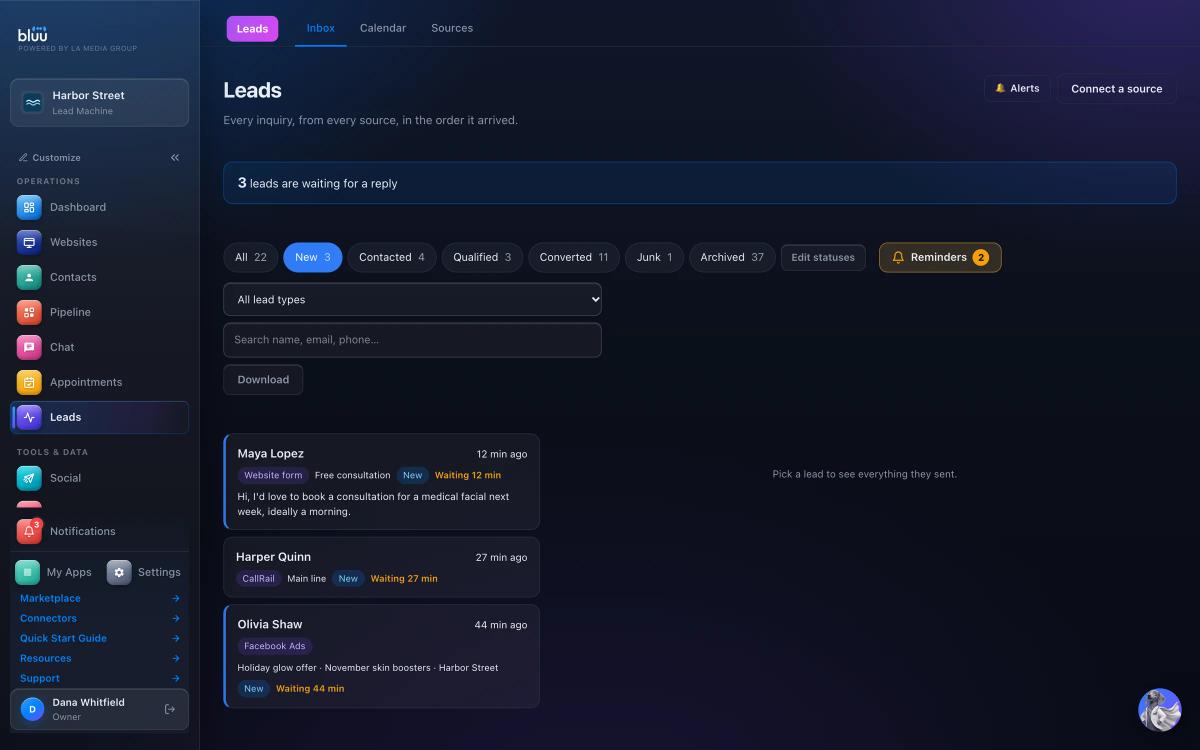
A banner at the top says how many leads are waiting for a reply, and it turns red when any lead has gone unopened for over an hour. One detail we're strict about: only a real reply stops the clock. A person answering in Chat, or by email or text from Bluu, moves the lead from New to Contacted. An AI answer or an automation doesn't count, because a customer can tell the difference and so should your numbers.
Alerts are set by each teammate under Alerts: Text me, Email me and In the dashboard. Put Bluu on your phone's home screen and new leads arrive as phone notifications too. It installs straight from the browser, so there's nothing to download.
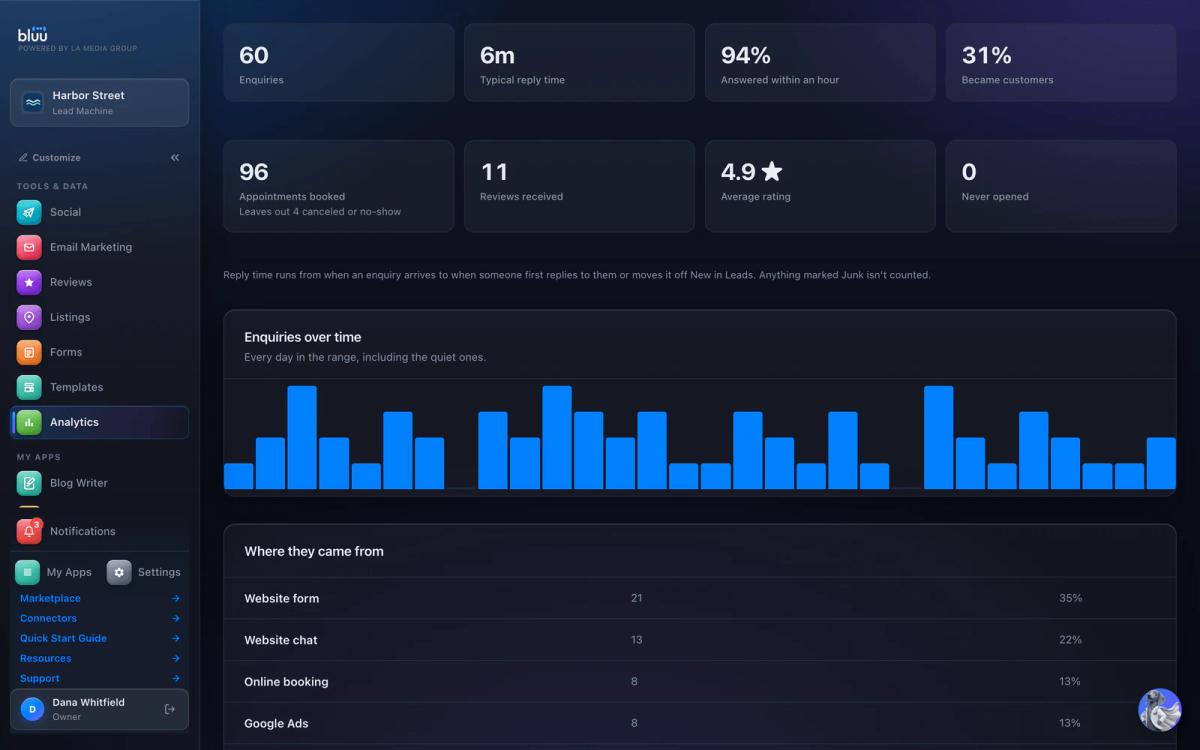
Then Analytics does the measuring from the steps above for you, with nothing to connect. Typical reply time is the median time from an inquiry arriving to someone first replying. Answered within an hour is the share of inquiries a person got to inside 60 minutes, and the ones still waiting count against it.
The replies themselves come from saved Templates, and the website chat lives in Chat, where website chat, email and texts from the same person stay in one thread. AI Chat, the after-hours option, is a paid upgrade on top of the plan. Texting from Bluu needs a business texting number paid from your balance and carrier approval, which takes days to weeks, so set that up early.
Where Bluu isn't the answer: if most of your leads are phone calls and you need a full call report (missed calls, call length, repeat callers), Bluu doesn't have one. It brings in calls from your own CallRail account, and CallRail's own reports are where that detail lives.
Mistakes that keep speed to lead slow
- Counting the auto-reply as the response. It buys you a few hours of goodwill. It doesn't answer the question, and the customer keeps shopping.
- Measuring the average. One ugly weekend makes the number useless. Use the median and the share answered within an hour.
- Alerts to a shared inbox nobody owns. If the alert goes to info@ and three people can see it, assume none of them will.
- Fast but empty replies. "Got it, will call you soon" at minute two is worse than a real answer at minute ten. Fast and useful is the goal.
- Ignoring the leads with no reply. They're invisible unless you look for them on purpose. Check every week until there are none.
If you're juggling a separate app for forms, another for chat and another for booking, that's usually where leads disappear. We wrote about that trade-off in all-in-one business software versus separate apps. And once a lead books, the next leak is the appointment itself: here's how to reduce no-shows.
See what's in the plan on the pricing page, or start with the measuring steps above this week. The number will tell you where to begin.
Frequently asked questions
What is a good speed to lead?
For a local service business, aim to reply within five minutes during business hours and first thing the next morning for leads that come in overnight. A realistic first target is a median under 15 minutes in business hours, at least 80% of leads answered within an hour, and no lead left without a reply.
How do you calculate speed to lead?
For each inquiry, note when it arrived and when a person first replied, then take the median of those gaps rather than the average. Alongside it, count the share of inquiries answered within an hour and the number that never got a reply, because those two numbers show where leads are actually being lost.
Is speed to lead the same as lead response time?
Yes. Speed to lead, lead response time and time to first response all describe the gap between a customer reaching out and your business replying. Some teams only count a reply from a person, which is the stricter and more useful way to measure it.
Does an automatic reply count for speed to lead?
Not really. An instant acknowledgment tells the customer they were heard and is worth sending, especially after hours, but it doesn't answer their question. Count the clock as stopped only when a person replies with an answer, a question that moves the job forward, or a time to talk.
How can a small team respond to leads faster?
Put every lead source into one inbox, send alerts to phones instead of email, decide in advance who answers in each time block, and keep first replies saved as templates. Then cover evenings and weekends with an automatic acknowledgment that includes a booking link, and review the numbers weekly.
Sources
- The Short Life of Online Sales Leads (Harvard Business Review, March 2011) (opens in a new tab)hbr.org/2011/03/the-short-life-of-online-sales-leads
- About ad rankings (Google Local Services Ads Help) (opens in a new tab)support.google.com/localservices/answer/7527305?hl=en
Bluu
Your whole business, in one place.
Leads, chat, booking, reviews, email, texts, forms and your website in one dashboard that talks to itself.
$199 $149 /month
$50 off every month, locked in for as long as you stay.
Start your 7-day free trial7 days free, card required. Cancel before day 8 and you won't be charged.
See pricing