How to Reduce No-Shows: 8 Fixes, Plus Wording You Can Copy
How to reduce no-shows with a 3-reminder schedule, deposits on the right bookings, a policy you can copy, and a same-day follow-up that wins people back.
Key takeaways
- Forgetting is the most common reason people miss appointments, so a timed reminder schedule fixes more no-shows than anything else.
- A good default is a confirmation at booking, an email three days before, a text the day before and a text two hours before.
- Every reminder should say how to reschedule, because a moved booking is a slot you keep and a skipped one is a slot you lose.
- Deposits work best on new customers, long or high-value appointments and peak times, not on every booking.
- Track your no-show rate monthly by appointment type and by new versus returning customers, then fix the worst slice first.
On this page
Most no-shows aren't rude. They're forgotten. If you want to know how to reduce no-shows, the short answer is a reminder schedule that lands at the right moments, a way to reschedule that takes one reply, and a deposit on the bookings that hurt most when they go empty.
Everything else on this page is the detail: the timing, the exact wording, a policy you can copy, and how to measure whether it's working.
Why people miss appointments
The research is mostly from healthcare, because clinics have tracked missed visits for decades, but the pattern holds for any appointment-based business. In a survey of 100 adults who had missed clinic appointments (opens in a new tab), forgetting was the most common reason given, well ahead of work conflicts in second place.
That's good news. Forgetting is the easiest cause to fix.
And reminders do fix some of it. A Cochrane review of mobile phone reminders (opens in a new tab) pooled randomized trials and found that text reminders raised attendance compared with no reminder, worked about as well as phone call reminders, and cost less per attended appointment. The authors rated the evidence low to moderate quality, so treat it as a solid nudge, not a miracle.
Here's what a no-show actually costs. Say you run a one-hour service at $120 and you lose three slots a week to no-shows. That's $360 of empty chair a week, before you count the staff you paid to wait and the customer you turned away because the slot looked full. Over a year it's real money, and most of it is recoverable.
How to reduce no-shows: eight fixes that work
Do these roughly in order. The first four cost you nothing but setup time.
1. Confirm every booking the moment it's made
A booking that only lives in your head (or on a sticky note by the phone) is easy to forget on both sides. Every booking should send the customer a confirmation right away with the date, the time, the address or video link, and what to bring.
Why it matters: the confirmation is the first reminder. It also catches mistakes early, like someone who booked Tuesday when they meant Thursday.
2. Send reminders on a schedule, not on a whim
One reminder helps. Three, well timed, help more, because each does a different job:
| When | Channel | Its job |
|---|---|---|
| 3 days before | Gives time to reschedule instead of skipping | |
| 1 day before | Text | The real "don't forget" |
| 2 hours before | Text | Catches the people running late or double-booked |
For appointments booked less than a day out, drop the first one. For appointments booked a month out, add one a week before.
Text first for anything within a day. A reminder email can sit unopened until after the appointment, while texts tend to get read within minutes.
3. Write reminders that make rescheduling easy
A customer who can't make it will often just not show up if moving the booking feels like a hassle. Make the easy path the one you want: tell them to reply.
Copy this for the day-before text:
Hi {first name}, a reminder that you're booked for {service} tomorrow at {time} with {team member}. Need to move it? Just reply to this text and we'll find a new time.
And for the two-hour text:
See you at {time} today, {first name}. We're at {address}. Running late? Reply and let us know.
A reschedule is a win. It's a booking you keep instead of a gap you eat.
4. Shorten the wait between booking and appointment
The further out a booking sits, the more life gets in the way. If your calendar lets people book eight weeks ahead for a routine service, consider opening it four weeks ahead instead, and use a waitlist for the overflow. Fill tomorrow's canceled slot from the waitlist the same afternoon.
5. Take a deposit on the bookings that hurt
Reminders fix forgetting. They don't fix the person who booked three places and will pick one on the day. For that, money works.
You don't need a deposit on everything. Put one on:
- New customers, who haven't built the habit of turning up.
- Long or high-value appointments, where an empty slot costs you the most.
- Peak times, like Saturday mornings, where you could have filled the slot twice over.
Keep it small enough not to scare off a real customer and big enough to make someone pick up the phone instead of ghosting. Many businesses set it at a fixed amount or a slice of the service price and credit it toward the bill.
6. Write a cancellation policy people actually read
"We may charge a fee" isn't a policy. Say exactly what happens, in plain words, and put it on the booking page and in the confirmation. Here's wording you can adapt:
We hold your time just for you. Please give us at least 24 hours' notice if you need to move or cancel, and we'll happily rebook you. If you cancel with less notice or don't arrive, your deposit is kept. Running late? We'll do what we can, but after 15 minutes we may need to rebook you.
Then enforce it, kindly and consistently. A policy you waive for everyone teaches everyone it doesn't exist. A policy you waive once, for a regular with a real emergency, earns loyalty.
7. Follow up every no-show the same day
The worst response to a no-show is silence. The customer feels awkward, assumes you're annoyed, and never books again. Send a short, warm message within a couple of hours:
Hi {first name}, we missed you today at {time}. Hope everything's okay. Want to grab a new time? Reply here or book at {booking link}.
No guilt, no fee talk in the first message. You'll win back more people than you expect, and the ones who don't reply have told you something too.
The same habit pays off before anyone books. A new inquiry answered within minutes is far more likely to turn into a booking than one answered tomorrow, which is exactly what speed to lead measures.
8. Track your no-show rate
You can't tell if any of this works without a number. Your no-show rate is simple:
No-show rate = no-shows ÷ total booked appointments in the period.
Track it monthly, and split it two ways: by appointment type, and by new versus returning customers. You'll usually find the problem is concentrated. Maybe it's first-time consultations, or one Friday evening slot. Fix that slice first instead of punishing everyone.
A reminder schedule you can copy
Here's the whole system on one page, from booking to follow-up:
| Moment | What goes out | Channel |
|---|---|---|
| Booking made | Confirmation with time, place, what to bring and your policy | |
| 3 days before | Reminder with a reply-to-reschedule line | |
| 1 day before | Reminder with a reply-to-reschedule line | Text |
| 2 hours before | Short "see you soon" with the address | Text |
| Marked no-show | Warm "we missed you" with a rebooking link | Email or text |
Set it up once and it runs for every booking. That's the point: a system that doesn't depend on someone remembering to call the day before.
How to reduce no-shows in Bluu
Here's how this looks in Bluu's Appointments app, using the real button names.
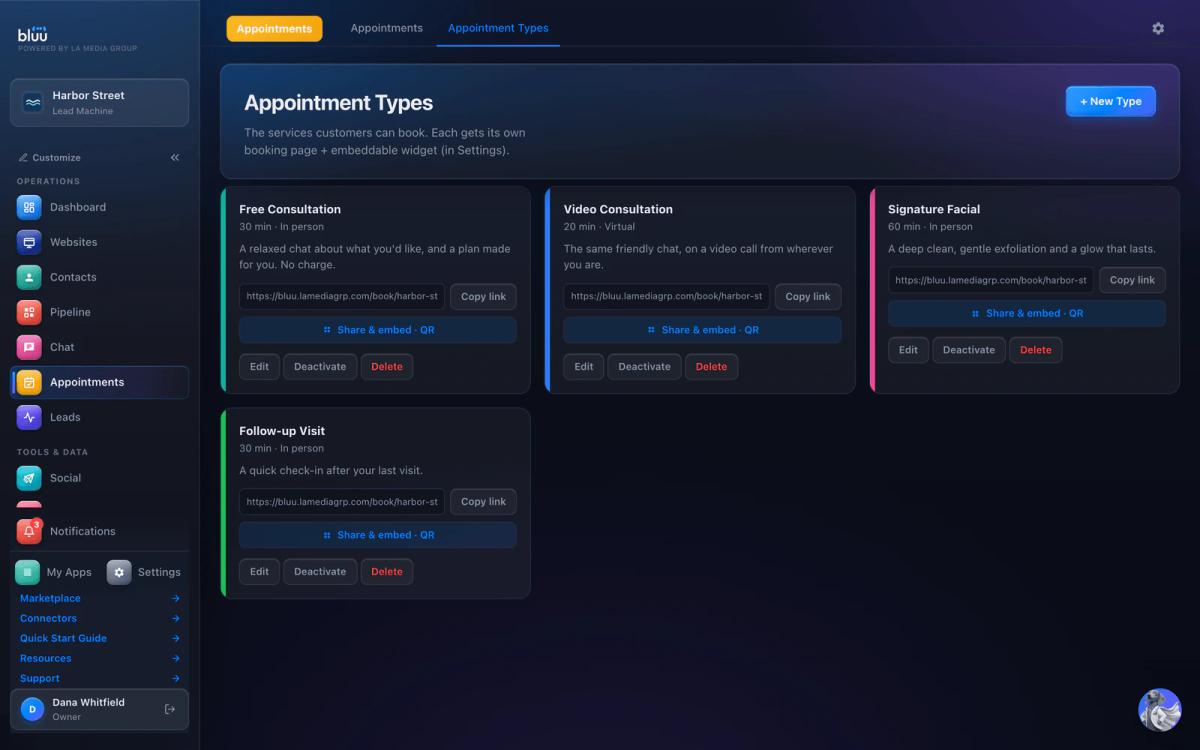
- Create the appointment type. In Appointments, open Appointment Types and press + New Type. Set the length, location, a buffer between bookings and the hours it can be booked.
- Add the reminders. Each type can send up to three reminders to the customer and three to your team, by email, text or both, at the times you choose, from a month before to five minutes before. A new type starts with none, so add the schedule above.
- Switch on a deposit where it counts. Connect your own payment account under Settings > Collect Payments, then switch on Charge for this appointment on the types that need it. The money goes straight to you, and the slot isn't confirmed until the payment lands.
- Share the booking page. Press Copy link, or open Share & embed for the website embed code and a QR code for your front desk.
- Run the day. Open any booking to Reschedule it (the calendar event moves, the reminders are rebuilt and the customer is emailed the new time) or mark it Completed or No-show. Your team gets an alert for new bookings, cancellations and no-shows.
Every booking also sends a confirmation email automatically. If the customer replies to it, the reply lands in Chat so your team can move the booking from one place. Keeping the booking, the reply and the customer's record together is the whole case for all-in-one business software: nobody has to check a second inbox to catch a reschedule.
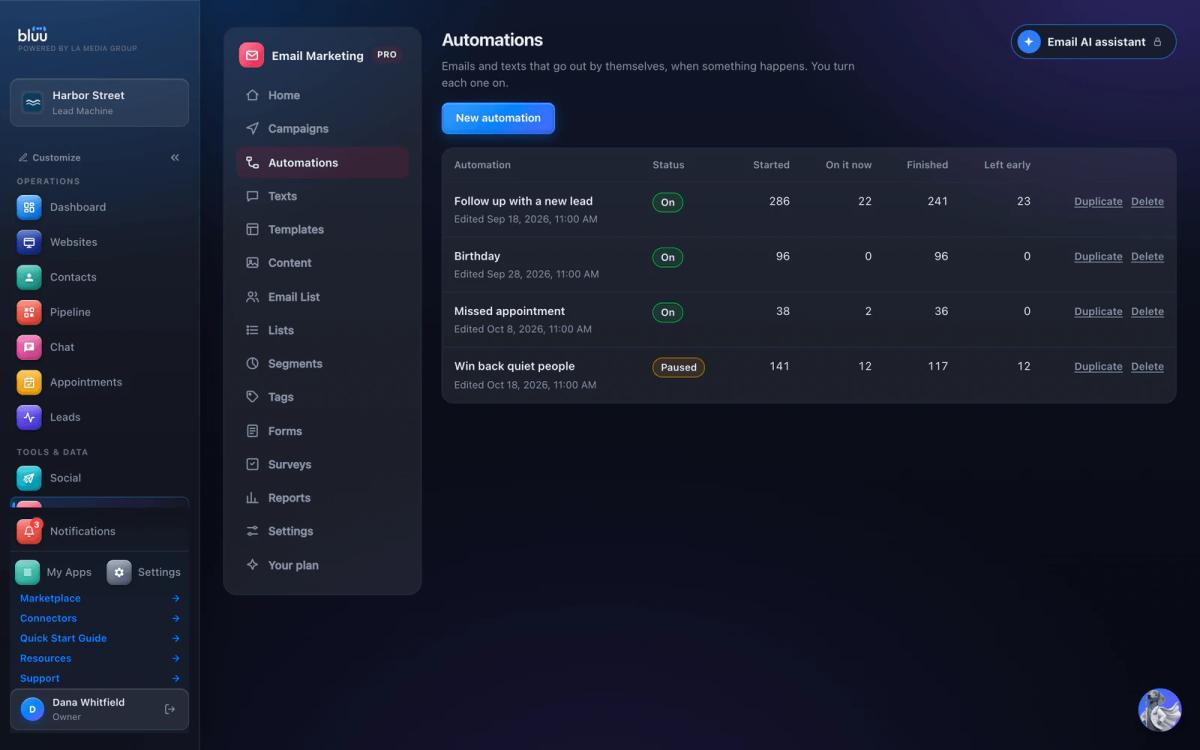
For the same-day "we missed you" message, Email Marketing has a ready-made missed appointment automation that starts when a booking is marked No-show. Automations come with the Pro plan and above, so it's a paid add-on, not part of the base plan. If you'd rather not add it, save the message as a reusable text in Templates and send it from the customer's card in a few seconds.
A few honest limits, so you can plan around them:
- Customers don't move their own booking from a link. They reply to the confirmation, and your team presses Reschedule. For most small teams that's a feature, since you see every change.
- Text reminders aren't free. Reminder emails are included. Texts come out of your prepaid balance at 3 cents each and go out from a business texting number, which needs carrier approval that can take days to weeks. Start with email reminders on day one and add texts once your number is approved.
- Google Calendar only. Bookings sync to Google Calendar, not Outlook or Apple Calendar.
The Bluu plan is $149 a month under the current limited offer ($199 list), with 7 days free to try it. A card is needed to start, and if you cancel before day 8 you're not charged. Everything else is on the pricing page.
Mistakes that make no-shows worse
- Reminders with no way out. "Don't forget your appointment" with no reply option turns a reschedule into a no-show. Always include the easy path.
- Too many reminders. Five messages for one haircut reads as nagging, and people start ignoring all of them. Three is plenty.
- A deposit on everyone, forever. Your regulars who have shown up twenty times don't need one. Asking them for a deposit feels like distrust.
- A policy you never enforce. If the no-show fee is never charged, your customers figure it out fast.
- Punishing in the first message. Lead the follow-up with concern and a rebooking link. If it keeps happening, that's a separate, private conversation.
- Not looking at the numbers. If you don't know whether no-shows went up or down last month, you're guessing which fix worked.
Start with confirmations and a three-reminder schedule this week. Add a deposit to your highest-risk appointment type next week. Check your no-show rate at the end of the month and adjust from there.
Frequently asked questions
How far in advance should you send appointment reminders?
Send three: an email about three days before so people have time to reschedule, a text the day before as the main reminder, and a short text two hours before. For bookings made less than a day out, skip the first one. For bookings a month or more out, add a reminder a week before.
Do text reminders really reduce no-shows?
Yes, on balance. A Cochrane review of randomized trials found text reminders raised attendance compared with no reminder and worked about as well as phone calls at a lower cost. The evidence was rated low to moderate quality, so pair texts with an easy way to reschedule and a deposit where it matters.
Should I charge a no-show fee or take a deposit?
A deposit usually works better, because it's paid before the appointment and gives people a reason to tell you when plans change. A fee charged afterward is harder to collect and feels like a punishment. Put deposits on new customers, long appointments and peak times rather than on everyone.
What should I say to a customer who didn't show up?
Message them the same day with concern, not a penalty: say you missed them, hope everything's okay, and give them a link or a reply option to rebook. Leave any fee conversation for later or for repeat no-shows. A warm first message wins back more bookings than a cold one.
How do I calculate my no-show rate?
Divide the number of no-shows by the total number of booked appointments in the same period. Track it every month and split it by appointment type and by new versus returning customers, because no-shows are usually concentrated in one slice you can fix directly.
Sources
- Mobile phone messaging reminders for attendance at healthcare appointments (Cochrane review, PubMed) (opens in a new tab)pubmed.ncbi.nlm.nih.gov/24310741
- Survey of why adults missed outpatient clinic appointments (PubMed Central) (opens in a new tab)pmc.ncbi.nlm.nih.gov/articles/PMC7671744
Bluu
Your whole business, in one place.
Leads, chat, booking, reviews, email, texts, forms and your website in one dashboard that talks to itself.
$199 $149 /month
$50 off every month, locked in for as long as you stay.
Start your 7-day free trial7 days free, card required. Cancel before day 8 and you won't be charged.
See pricing