Skip to content
Powered by LA Media Group
  • Pricing
  • Websites
  • Book a call
Log inStart free for 7 days

Run the business

  • DashboardYour whole business on one screen
  • WebsitesYour site, built and run for you
  • ContactsEvery customer, one record each
  • PipelineEvery deal, and what happens next
  • ChatWebsite chat, email and texts in one thread
  • AppointmentsOnline booking that can't double book
  • LeadsEvery enquiry, one inbox

Grow and get found

  • SocialPost to every channel from one place
  • Email MarketingUpgradeCampaigns, automations and an AI manager
  • ReviewsGet more reviews, answer every one
  • ListingsUpgradeRight details on 90+ directories
  • FormsForms that fill your CRM
  • TemplatesWrite it once, use it everywhere
  • AnalyticsWhat's working, while it's happening

Marketplace

  • Blog WriterSEO-ready posts from a topic
  • Products & PackagesSell packages and memberships
  • EventsAn events calendar on your site
A business owner reading a website chat on her phone, from the Bluu filmSee all of it in 3:18The Bluu filmSee every app
Bluu AI Trained on your business, not the internet's

AI that does the work

AI Chat AIAnswers your website day and night, captures every lead and books the appointment.Bluu Assistant AIYour digital doctor on every screen. Ask how to do anything, in plain English.Email Marketing AIAsk for a campaign, a list or an automation. It builds the draft for your yes.Social AIWrites posts for every channel from your Business Profile. You approve every one.Blog Writer AIA finished, SEO-ready post from a topic or a service name.

Powered by LA Media Group

Want us to grow it for you?

The agency behind Bluu runs your ads, SEO, website and email, and every result lands in your dashboard, live.

All marketing services Book a call with our team
Facebook & Instagram adsReach the people who didn't know they wanted it, before they start lookingGoogle AdsBe the first thing they see, the moment they need youLocal SEOGet found by the people already looking for youWebsitesA website that brings you work, not complimentsEmail & SMSThe cheapest customer is the one you already hadContentAnswer the questions before they call anyone, and get quoted by Google and AI answers

Run the business

DashboardWebsitesContactsPipelineChatAppointmentsLeads

Grow and get found

SocialEmail MarketingReviewsListingsFormsTemplatesAnalytics

Marketplace

Blog WriterProducts & PackagesEvents
Marketing by LA Media GroupPricingWebsitesBook a callLog in
Start your free 7 days

Your whole business.
One login.

Start free for 7 days Book a call

Questions? info@lamediagrp.com. We answer by email and on booked calls.

Run the business

  • Dashboard
  • Websites
  • Contacts
  • Pipeline
  • Chat
  • Appointments
  • Leads

Grow and get found

  • Social
  • Email Marketing
  • Reviews
  • Listings
  • Forms
  • Templates
  • Analytics

Marketplace

  • Blog Writer
  • Products & Packages
  • Events

Bluu

  • Every app
  • Pricing
  • Websites
  • Book a call
  • Log in
  • Start free
  • Terms of Service
  • Privacy Policy
  • Launch offer terms
  • Cancellation policy
  • Refund policy
  • Acceptable use
  • Messaging terms
  • AI terms
  • Website services terms
  • Data processing
  • Cookies
Powered by LA Media Group© 2026 LA Media Group LLC. Bluu is made by LA Media Group.Davie, Florida · info@lamediagrp.com
From$149/monthStart freeSee pricingPricing

Apps / Run the business

Every customer you have ever had, in one place.

Enquiries, bookings, chats and forms all land here automatically, with the source stamped on each. Nobody types a name twice, and nothing gets lost between the front desk and the phone.

Start free for 7 days Book a call

Contacts is included in Bluu, $149/month with every standard app.
bluu.lamediagrp.com/contacts
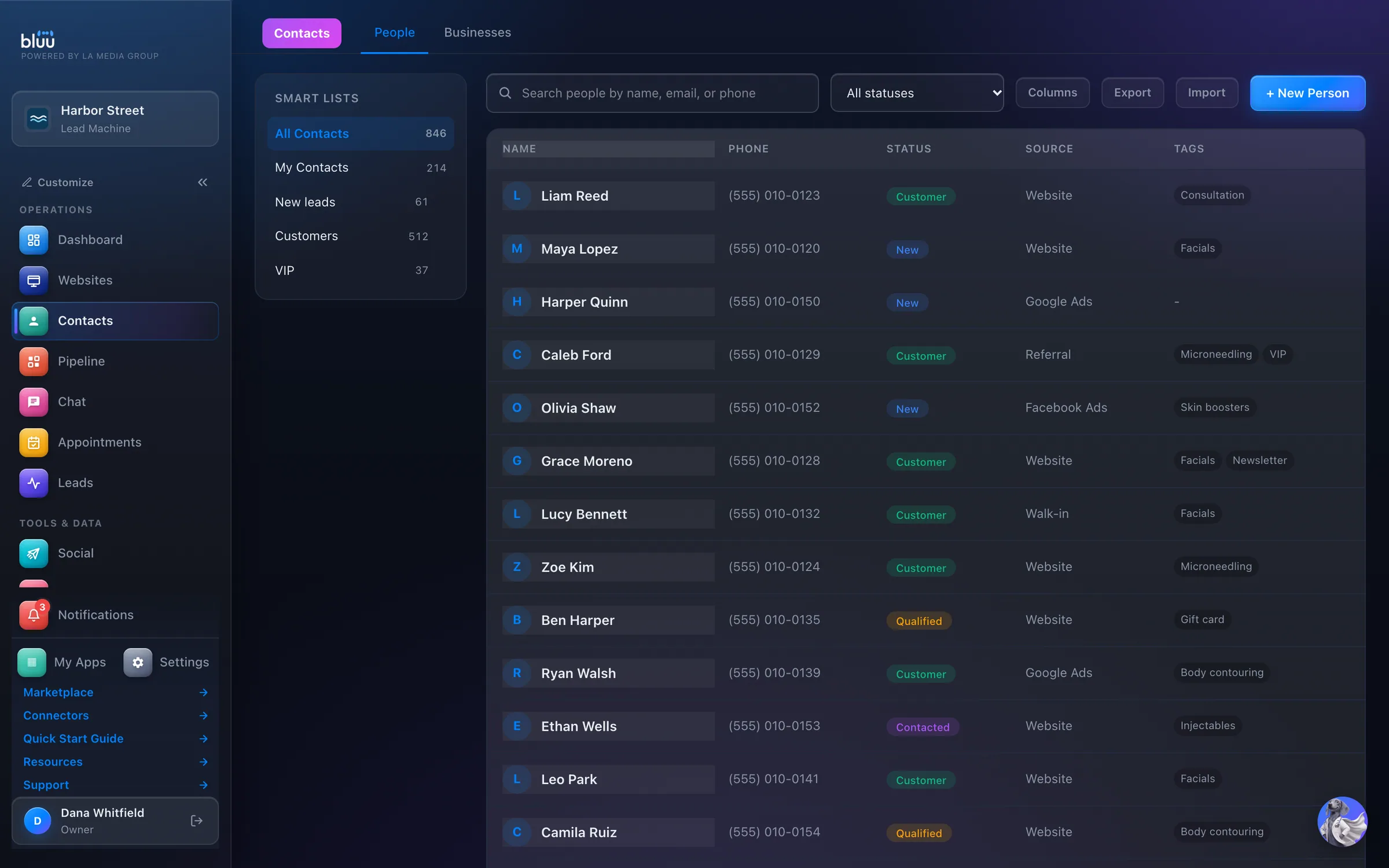
Contacts in the Bluu dashboard, shown with Harbor Street, a sample business

Shown with Harbor Street, a sample business.

What Contacts does

Every customer, one record each.

Contacts is one record for every person who has ever got in touch with your business. Forms, bookings, website chat and every lead source find the person or create them by themselves, with where they came from stamped on the record.

Open anyone and the whole story is on one page: what they sent you, every email, text and chat, your notes, reminders, deals and files. Email them, text them, set a reminder or book them in from the same screen.

There's no limit on contacts and no per-contact fee. Export any slice to a spreadsheet whenever you like.

01

Nobody types twice

People arrive from your forms, bookings, chat and lead sources already filled in, and a returning customer is matched to the record you have.

02

Everyone knows the story

Whoever picks up the conversation sees what was said, when and by which channel, without asking around.

03

Their wishes, respected

Switch off email, texts or both for a person, and every app in Bluu respects it.

At a glance

Everything it does, in plain words.

They arrive by themselves

From forms, chat, online bookings, Facebook lead ads and tracked calls, with where they came from stamped on each. Or import a list.

The whole story on one card

Activity, messages, notes, appointments and deals for that person, in order.

One person stays one person

Matched by email, or by phone. Two records for the same customer? Merge them in a click.

Smart lists

A saved search that keeps itself up to date.

Do Not Disturb, honored everywhere

Switch off email, texts or both for a person, and every app respects it.

Your data, no fees

No limit on contacts, no per-contact fee, and export any slice to a spreadsheet whenever you like.

How it works

From first look to second nature.

  1. 1

    Bring your list in

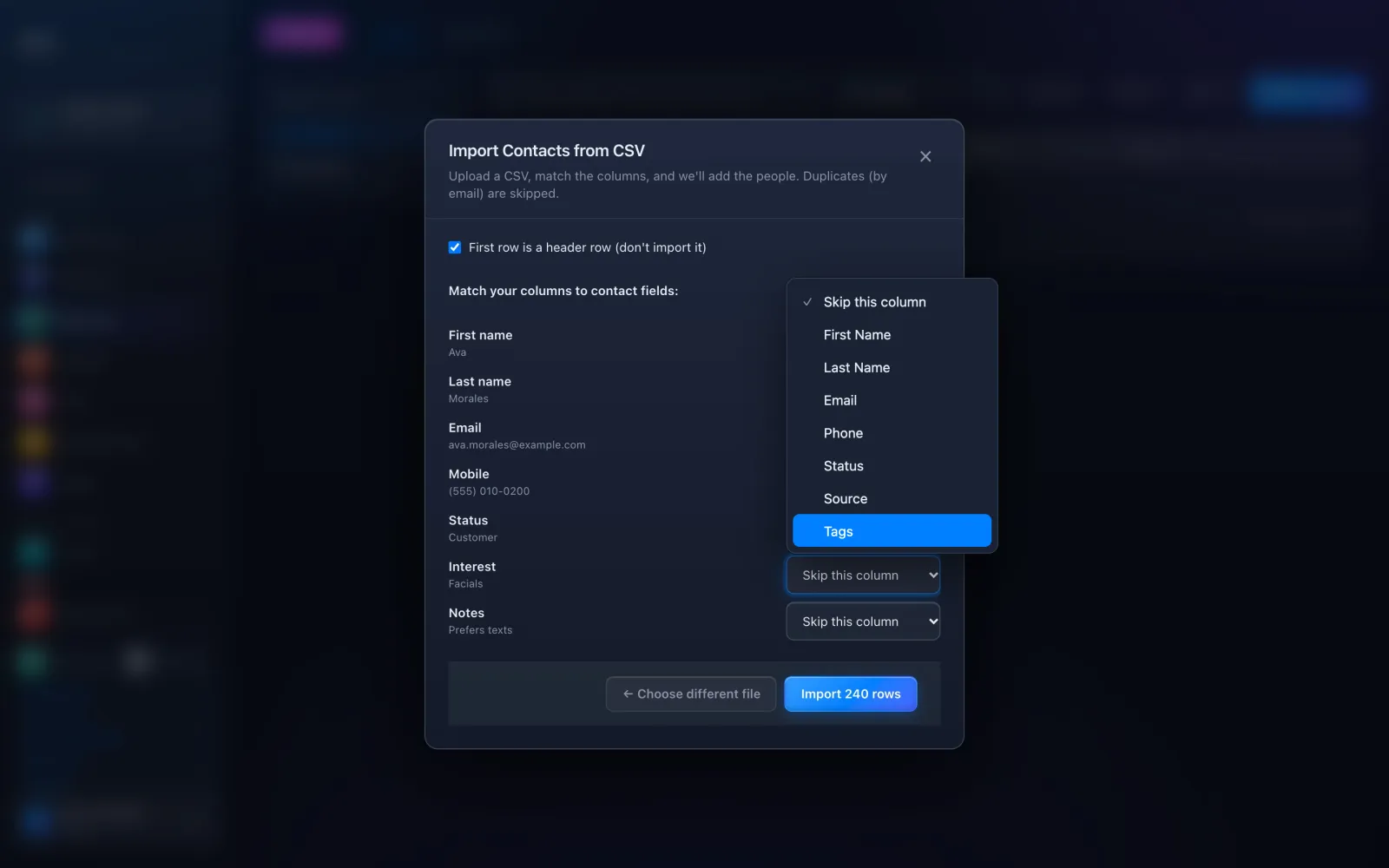
    Press Import, choose a CSV file and match each column to First Name, Last Name, Email, Phone, Status, Source or Tags. Anyone already there by email is skipped.
    Bring your list in
  2. 2

    New people add themselves

    Every form, booking, website chat and lead finds the person or creates them, with the source stamped and a line on their Activity saying what happened.

  3. 3

    Open the whole story

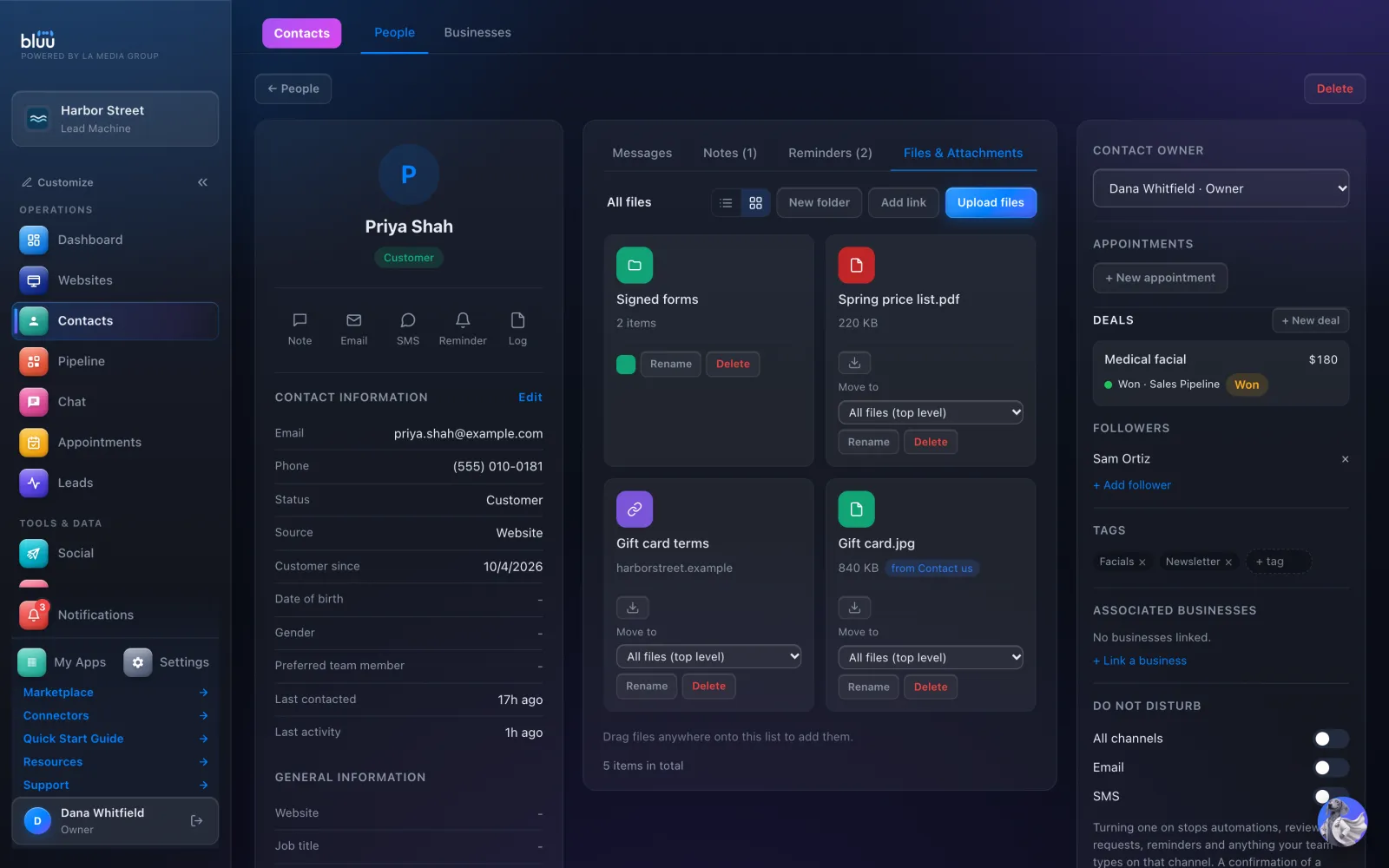
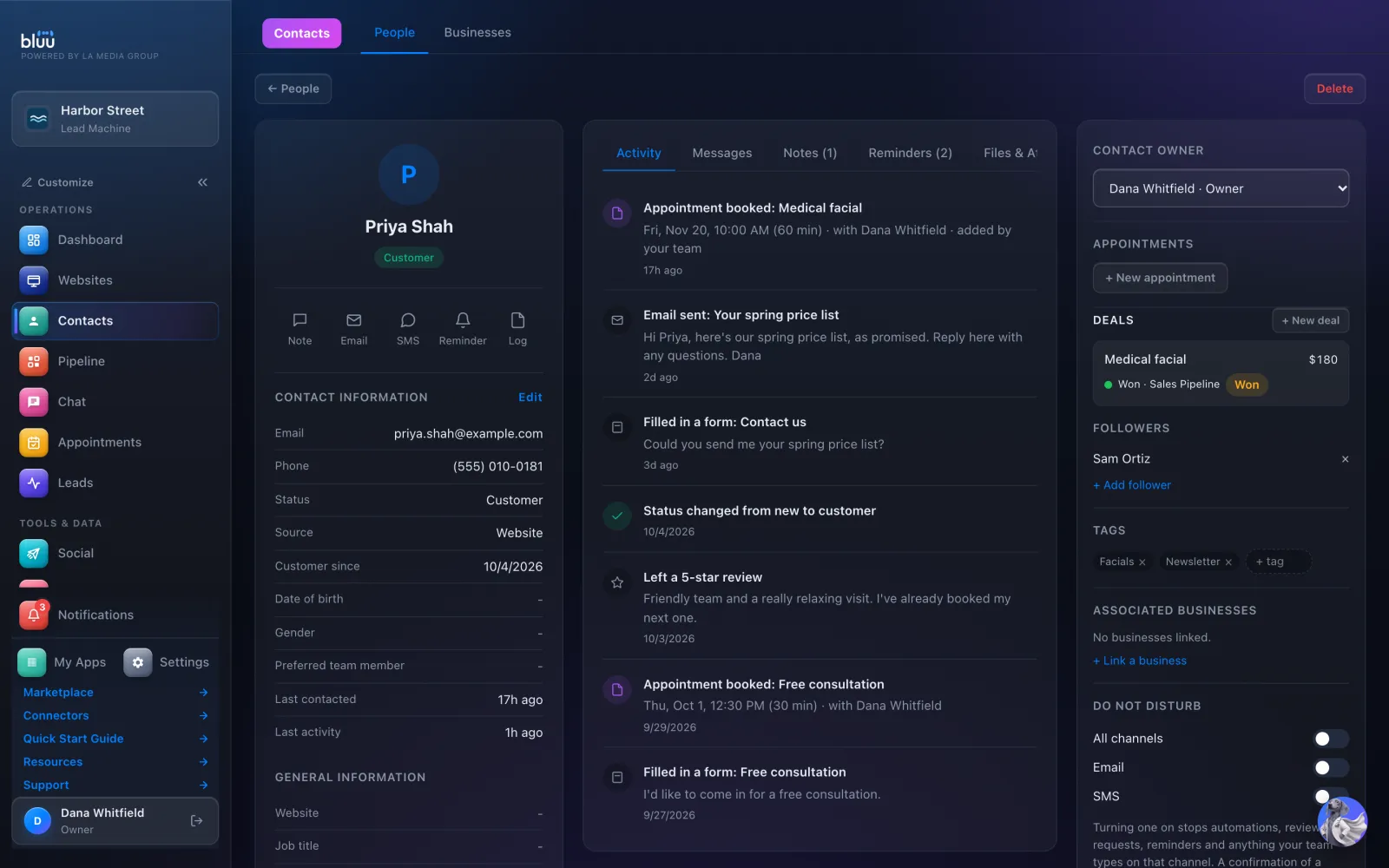
    One record shows Contact Information, then Activity, Messages, Notes, Reminders and Files & Attachments, with deals, followers and tags beside them.
    Open the whole story
  4. 4

    Reply from the record

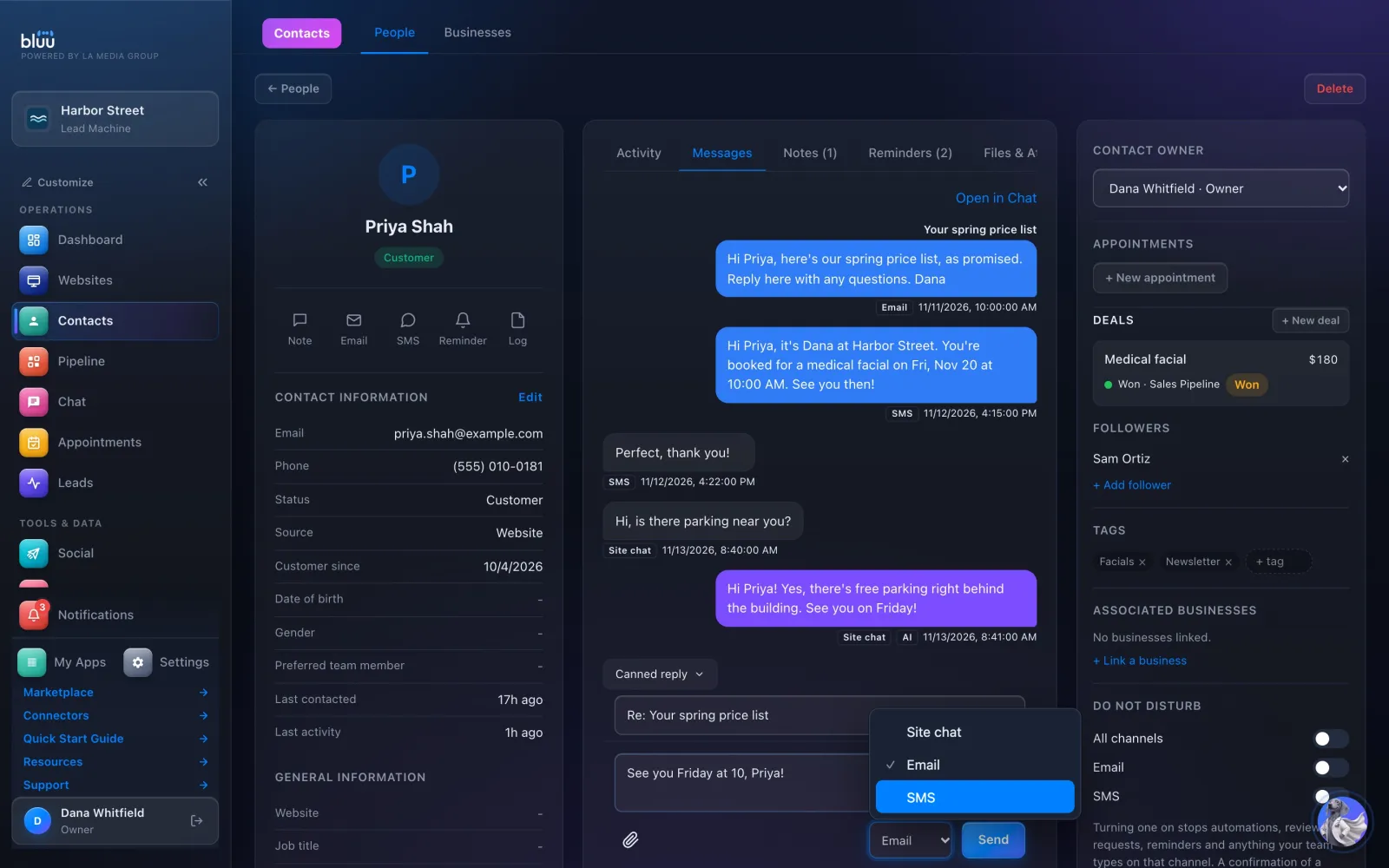
    On Messages, choose Send this by: Site chat, Email or SMS. Your reply joins the same thread your team sees in Chat.
    Reply from the record
  5. 5

    Save the views you use

    Search or filter by status, then press + beside Smart Lists to save it. The list keeps its own count up to date.

In depth

Every part of Contacts.

The record

Everything about one person, on one page.

  • Five tabs. Activity, Messages, Notes, Reminders and Files & Attachments. Activity is written as things happen: a form filled in, a booking, a deal moved, a review left.
  • Quick actions. Note, Email, SMS, Reminder and Log sit under their name. Email and SMS grey out when Do Not Disturb is on.
  • Your own fields. Press + Property to add a custom field to every contact: text, long text, number, date, dropdown or yes/no.
  • Owner and followers. Give each person a Contact Owner. Followers are told when that person sends a new enquiry, replies or books.
  • Reminders for anyone. Set a reminder for yourself or a colleague, by email, in the dashboard or as a phone notification.
  • Businesses too. Keep company records under Businesses and link the people who work there.

One person stays one person

Duplicates are caught, and fixed in one step.

  • Matched on the way in. A lead finds the person by email, or by phone however the number is typed. Imports and bookings match on email.
  • Possible duplicates. When two records share an email, a phone number or an exact name, the record says so, with a Merge button.
  • Merge in one step. Choose which record stays and what it keeps. Notes, messages, deals, appointments, files and lists all move onto it, and nothing is sent to the customer.
  • Other emails and phones. Addresses kept from a merge stay on the record, so the next form or text from any of them lands in the right place.
  • Statuses that mean something. New, Contacted, Qualified, Customer and Inactive. Marking someone Customer stamps Customer since with the date.

Do Not Disturb, everywhere

One switch that every app obeys.

  • One switch per channel. All channels, Email or SMS. Turning one on stops automations, review requests, reminders and anything your team types on that channel.
  • STOP works by itself. Someone who texts STOP is switched off from texts automatically, and their record shows what they wrote.
  • Bounces and unsubscribes shown. If an email bounced, was marked as spam or they unsubscribed, a banner on the record says so, and when.
  • Booking notices still arrive. A confirmation of a booking they just made, and a notice that their appointment moved, still go by email.

Files and your data

A drive on every customer, and a way out for all of it.

  • A drive for every customer. Upload files up to 25 MB, add links, and sort them into colored folders, in a list or a grid.
  • Form attachments land here. Anything a customer attaches on one of your forms turns up on their record, tagged with the form's name.
  • Preview without downloading. Photos, video, audio and PDFs open right on the record, with zoom for photos.
  • Private unless you say. Files have their own permission, so Staff can't open documents unless an Owner allows it.
  • Export whenever you like. Export downloads the list you're looking at as a spreadsheet, with every field, custom fields, notes, deals and reminders.

See more of it

The real screens.

One customer's record: details, activity, deals, followers and Do Not Disturb on one page.
Email, text and website chat with one person in a single thread, with Send this by to pick the channel.
Files & Attachments, with a folder, a PDF, a link and a photo that arrived on a form.
Importing a spreadsheet, with each column matched to a contact field before anything is added.

It talks to the rest of Bluu

Contacts hands its work to the others.

Contacts
  • LeadsEvery lead with an email or phone becomes a contact, and a reply sent from the record counts as the reply on their lead.
  • Pipeline+ New deal on a record puts the person on your board in the stage you choose, and their deals show back on the record.
  • Appointments+ New appointment books the person without retyping, and every booking is written to their Activity.
  • ChatOpen in Chat opens the same thread, and Chat shows the same notes, followers and deals beside the conversation.
  • Email MarketingYour contacts are your audience, and their lists, consent and what they've been sent show on the record.

Questions

Asked, and answered.

Anything else? info@lamediagrp.com

Is there a limit on how many contacts I can have?

No. There's no cap on contacts and no per-contact fee, and your whole team works from the same list.

Can I bring in my existing customer list?

Yes. Press Import, choose a CSV file and match the columns. Up to 5,000 rows a file, and anyone already there by email is skipped.

What happens when the same person shows up twice?

Bluu flags possible duplicates by email, phone or name. Press Merge, choose what to keep, and everything moves onto one record. It never merges by itself, and a merge can't be undone.

Can I get my data out?

Any time. Export downloads exactly what your filters show as a spreadsheet, with notes, deals and reminders included. No request, no wait, no fee.

Does texting a contact cost extra?

Texts come from your prepaid balance, about 3 cents each, and need a business phone number and text message registration. Emails you send from a contact are included.

Can staff see every customer's files?

Only if you let them. Files & Attachments has its own permission: Owners and Managers have it, and Staff don't unless an Owner turns it on in Settings > Roles.

Previous app WebsitesYour site, built and run for youNext app PipelineEvery deal, and what happens next

Your whole business,
in one place.

Start free for 7 days. Then $149 a month, locked in.

Start your free trial Book a call