
Skip to content
Powered by LA Media Group
  • Pricing
  • Websites
  • Book a call
Log inStart free for 7 days

Run the business

  • DashboardYour whole business on one screen
  • WebsitesYour site, built and run for you
  • ContactsEvery customer, one record each
  • PipelineEvery deal, and what happens next
  • ChatWebsite chat, email and texts in one thread
  • AppointmentsOnline booking that can't double book
  • LeadsEvery enquiry, one inbox

Grow and get found

  • SocialPost to every channel from one place
  • Email MarketingUpgradeCampaigns, automations and an AI manager
  • ReviewsGet more reviews, answer every one
  • ListingsUpgradeRight details on 90+ directories
  • FormsForms that fill your CRM
  • TemplatesWrite it once, use it everywhere
  • AnalyticsWhat's working, while it's happening

Marketplace

  • Blog WriterSEO-ready posts from a topic
  • Products & PackagesSell packages and memberships
  • EventsAn events calendar on your site
A business owner reading a website chat on her phone, from the Bluu filmSee all of it in 3:18The Bluu filmSee every app
Bluu AI Trained on your business, not the internet's

AI that does the work

AI Chat AIAnswers your website day and night, captures every lead and books the appointment.Bluu Assistant AIYour digital doctor on every screen. Ask how to do anything, in plain English.Email Marketing AIAsk for a campaign, a list or an automation. It builds the draft for your yes.Social AIWrites posts for every channel from your Business Profile. You approve every one.Blog Writer AIA finished, SEO-ready post from a topic or a service name.

Powered by LA Media Group

Want us to grow it for you?

The agency behind Bluu runs your ads, SEO, website and email, and every result lands in your dashboard, live.

All marketing services Book a call with our team
Facebook & Instagram adsReach the people who didn't know they wanted it, before they start lookingGoogle AdsBe the first thing they see, the moment they need youLocal SEOGet found by the people already looking for youWebsitesA website that brings you work, not complimentsEmail & SMSThe cheapest customer is the one you already hadContentAnswer the questions before they call anyone, and get quoted by Google and AI answers

Run the business

DashboardWebsitesContactsPipelineChatAppointmentsLeads

Grow and get found

SocialEmail MarketingReviewsListingsFormsTemplatesAnalytics

Marketplace

Blog WriterProducts & PackagesEvents
Marketing by LA Media GroupPricingWebsitesBook a callLog in
Start your free 7 days

Your whole business.
One login.

Start free for 7 days Book a call

Questions? info@lamediagrp.com. We answer by email and on booked calls.

Run the business

  • Dashboard
  • Websites
  • Contacts
  • Pipeline
  • Chat
  • Appointments
  • Leads

Grow and get found

  • Social
  • Email Marketing
  • Reviews
  • Listings
  • Forms
  • Templates
  • Analytics

Marketplace

  • Blog Writer
  • Products & Packages
  • Events

Bluu

  • Every app
  • Pricing
  • Websites
  • Book a call
  • Log in
  • Start free
  • Terms of Service
  • Privacy Policy
  • Launch offer terms
  • Cancellation policy
  • Refund policy
  • Acceptable use
  • Messaging terms
  • AI terms
  • Website services terms
  • Data processing
  • Cookies
Powered by LA Media Group© 2026 LA Media Group LLC. Bluu is made by LA Media Group.Davie, Florida · info@lamediagrp.com
From$149/monthStart freeSee pricingPricing

Apps / Grow and get foundPowered by AI

Post everywhere, from one place.

Write it once. Send it to Facebook, Instagram, LinkedIn, TikTok, Pinterest, YouTube and your Google listing at the same time, or line up a month of posts in one sitting.

Start free for 7 days Book a call

Social is included in Bluu, $149/month with every standard app.
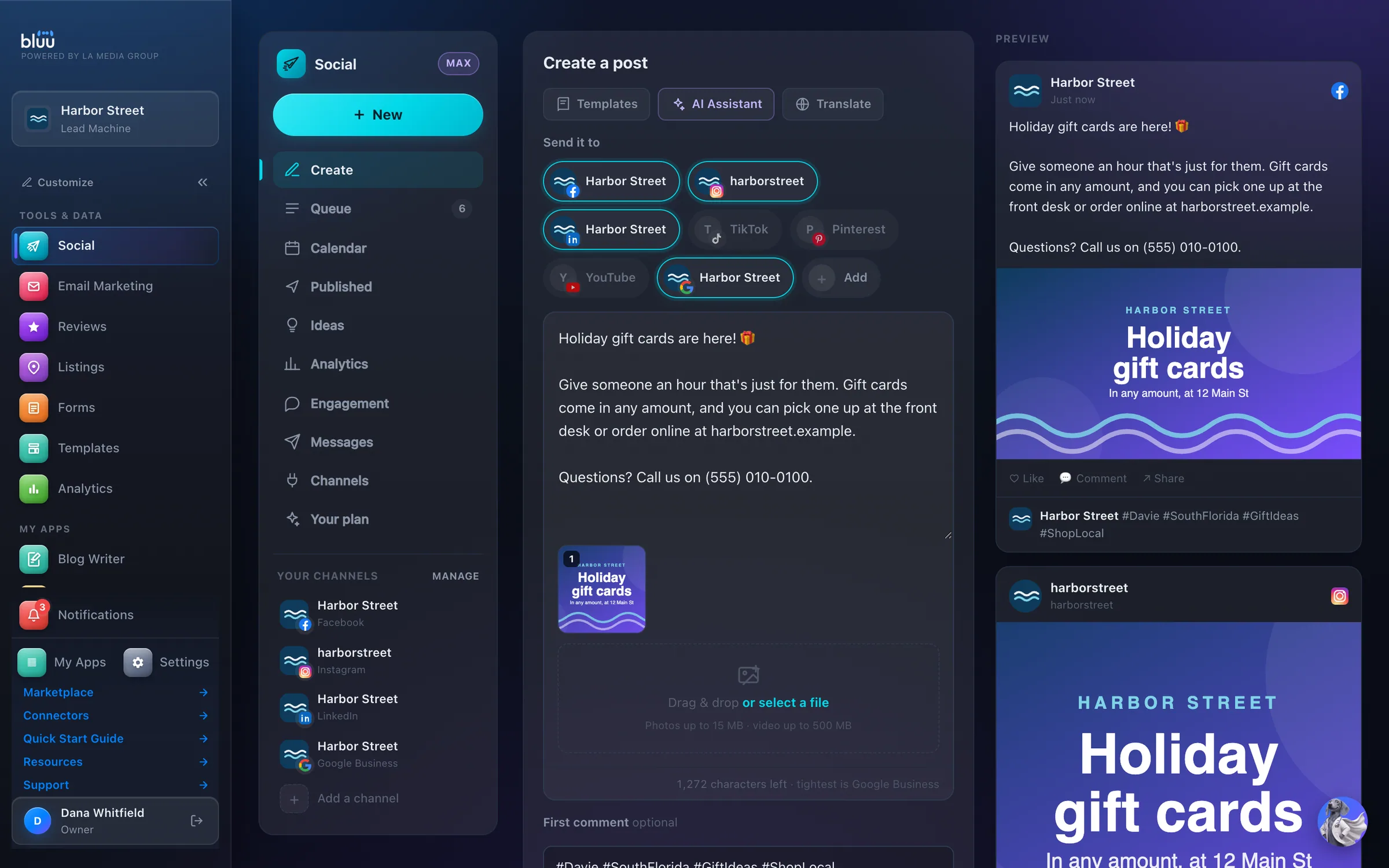
bluu.lamediagrp.com/social
Social in the Bluu dashboard, shown with Harbor Street, a sample business

Shown with Harbor Street, a sample business.

What Social does

Post to every channel from one place.

Social is where you write a post once and send it to Facebook, Instagram, LinkedIn, TikTok, Pinterest, YouTube and your Google Business listing. Pick the channels, add photos or a video, and a live preview for each one fills in as you type.

Post now, schedule it, or save a draft for someone on your team to check. A calendar shows the weeks ahead, and the Queue and Published tabs show exactly what went out on each channel, and why anything didn't.

Social's Free plan covers every channel, with unlimited posts and unlimited team logins. Social Pro adds the numbers and one inbox for comments and Instagram messages. Social Max adds AI that writes your posts from your own Business Profile.

01

Everywhere at once

One post goes to every channel you've connected, and you see how it will look on each one before it goes.

02

Never stuck for words

128 ready-made post ideas sit one click away. On Social Max, the AI writes a draft from what your business actually offers.

03

No silent failures

Every channel reports back in plain words. If one refuses a post or signs you out, you see the reason and a button to fix it.

At a glance

Everything it does, in plain words.

Seven channels, one composer

Facebook, Instagram, LinkedIn, TikTok, Pinterest, YouTube and Google Business, with a live preview for each.

Photos, carousels, video

And a first comment that posts underneath.

A calendar for the month

Post now, schedule, or save a draft for someone to check.

Never stuck for an idea

128 ready-made post ideas in eight categories.

Your accounts, your logins

Connect each channel yourself. We never see a password.

Posts that write themselves

On Social Max, AI writes your posts from your own Business Profile, per channel, and you approve every word.

How it works

From first look to second nature.

  1. 1

    Connect your channels

    Open Channels and press Connect for each account. You sign in yourself, and we never see a password. Facebook, LinkedIn, Pinterest and Google Business then ask which Page, board or location to post to.

  2. 2

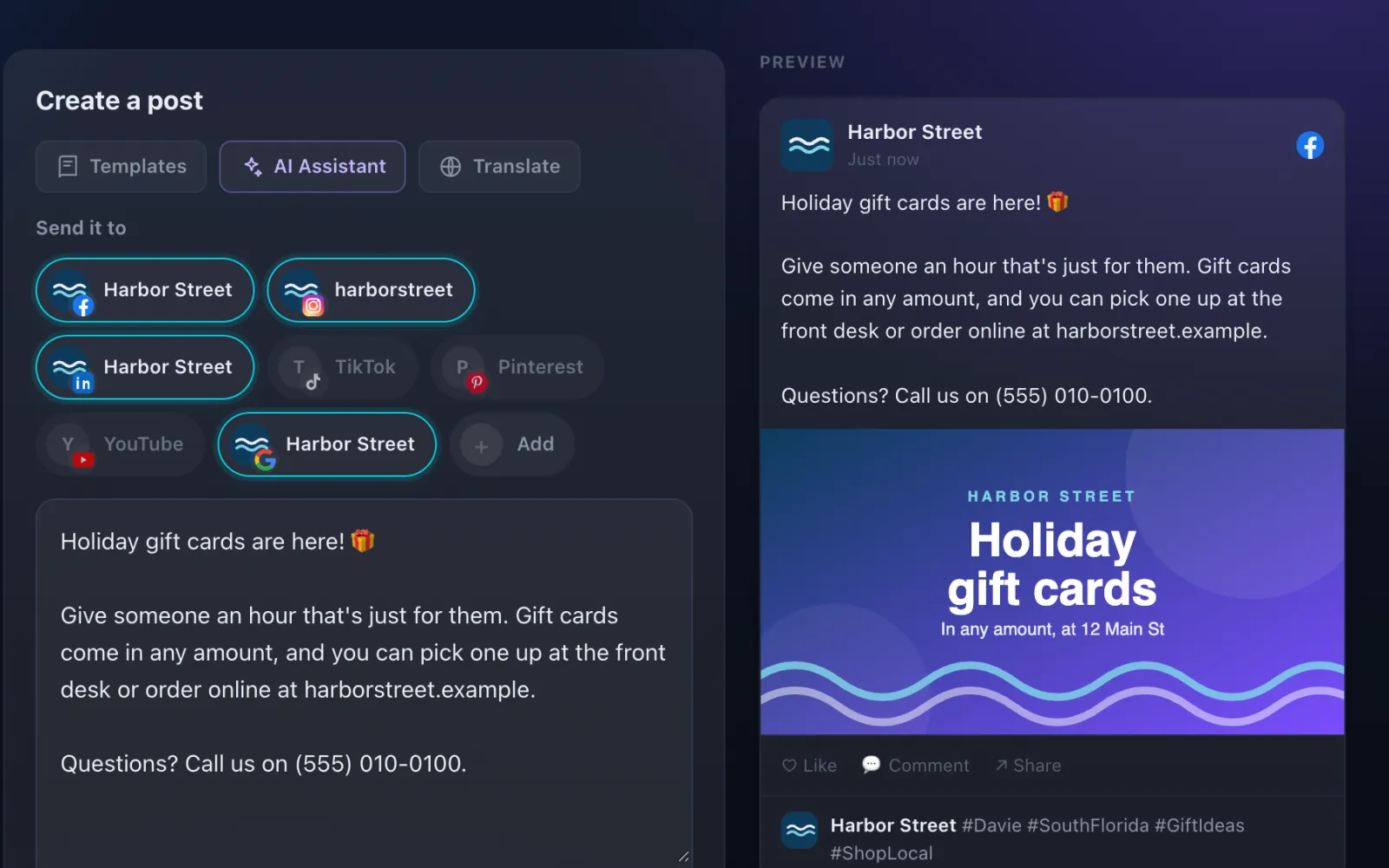
    Write it once

    In Create, every connected channel is already selected under Send it to. Type your caption, drop in photos or a video, and each channel's preview updates as you go.
    Write it once
  3. 3

    Make it fit each channel

    Give each channel its own version if you like: a fuller paragraph for LinkedIn, a short line for Instagram. Each tab shows that channel's limit and a tip, and an empty tab simply uses your shared caption.

  4. 4

    Schedule it

    Choose Post now, Schedule or Save as draft. Usually a good time suggests hours for the channels you picked, in your business's own time zone.

  5. 5

    See what happened

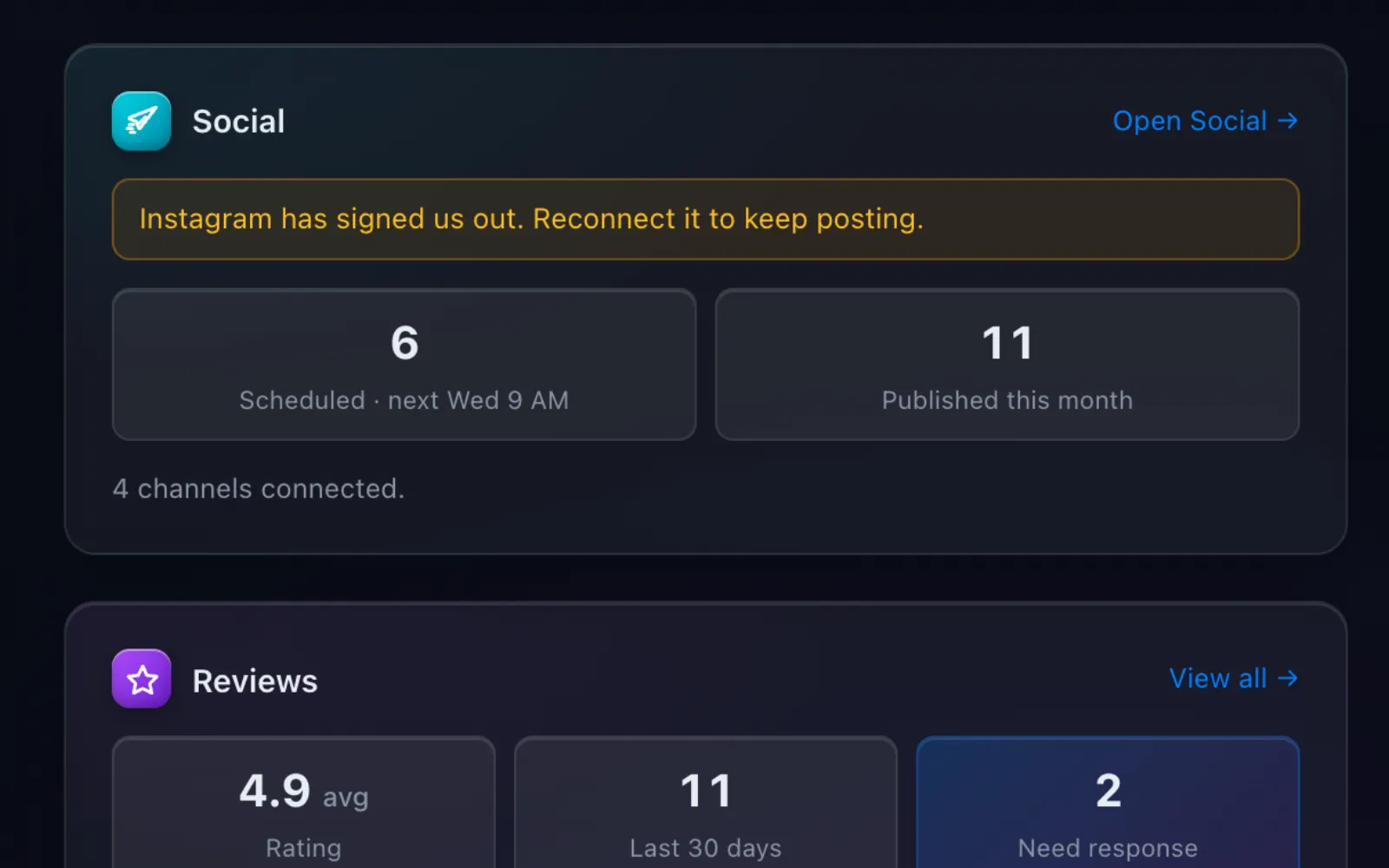
    Published shows each channel's result, with a View link to the live post. The Social card on your Dashboard shows what's scheduled, what went out this month, and any channel that needs reconnecting.
    See what happened

Bluu AITrained on your business, not the internet's

Posts that write themselves, on Social Max

Social Max, $49 a month, adds an AI Assistant to Create. Say what the post is about or pick a starter, choose a tone, and press Write it for me. It writes from your Business Profile, so it knows your services, prices and hours, and you read and edit every word before anything publishes.

Writes from your business

It uses the services, prices, hours and locations in your Business Profile. If your Business Profile is empty, it asks you to fill it in first rather than guess.

Told never to make things up

It's told never to invent a price, an offer, a discount, a date or a result, and never to give professional advice.

Sized for your channels

It knows which channels the post is going to and keeps it short enough for the tightest one.

You decide, every time

You get a draft to edit, then Add to my post or Use this. Nothing goes out until you post or schedule it yourself.

Captions from video, and Translate

Max can also write a caption from an attached video for Facebook, Instagram, TikTok and YouTube, and translate your caption into languages including Spanish, French and Haitian Creole.

A clear monthly allowance

Up to 150 AI-written posts a month, and it tells you when you're getting close. You can always keep writing and scheduling posts yourself.

In depth

Every part of Social.

Writing and posting

All of this is on the Free plan.

  • Seven channels, one composer. Facebook, Instagram, LinkedIn, TikTok, Pinterest, YouTube and Google Business, with a live preview for each one as you type.
  • Photos, carousels and video. Up to 10 photos in one post, or a single video. Instagram and Pinterest previews put the picture first, the way those apps do.
  • A first comment. Put hashtags or a link in a first comment that posts underneath the moment the post goes live, so the caption stays clean.
  • Stops a bad post before it goes. It tells you in plain words what's wrong, like Instagram needing a photo or a caption over Pinterest's 500 characters, before you can post.
  • No blanks left in. Post ideas have blanks for you to fill in. Until every one is filled, Post and Schedule stay switched off, so nobody ever sees a placeholder.
  • Fix a typo on a live post. Edit caption on the Published tab changes the words where the post is already live, on Facebook, LinkedIn, Google Business and YouTube.

Planning and tracking

Know what's going out, and what already went.

  • Queue. Everything scheduled, every draft waiting for a look, and anything that didn't send. Each one has an Edit button, so changing a post never means starting again.
  • Calendar. Month and Week views of everything scheduled and published. Press the + on any upcoming day and Create opens with that day already picked.
  • The truth, per channel. One post to six channels shows six results. Partly sent means some went and some didn't, with the reason for each one in words.
  • 128 post ideas. Tips, how-tos, lists, stories, case studies, behind the scenes, questions and opinions, 16 of each, with Our picks to start from. Pick one, fill in the blanks, send it.
  • Alerts when something breaks. If a post can't be sent or a channel signs you out, you hear about it by email, in the dashboard and on your phone. A banner also shows on every Social tab until it's fixed.

Social Pro

$29 a month. The numbers behind every post, and one place to answer people.

  • How every post did. Reach, reactions, comments and shares for every post on every channel, with your best posts ranked at the top.
  • Each channel at a glance. Followers, reach and impressions per channel, your posting rhythm, and your best day to post once there are enough posts to tell.
  • Every comment in one list. Comments from Facebook, Instagram, LinkedIn, TikTok and YouTube land in Engagement, with a count of how many still need a reply. Reply publicly, hide, like or delete where the channel allows it.
  • Replies made anywhere. A reply you typed in the Facebook app on your phone still shows here, marked Replied, so nobody answers the same person twice.
  • Instagram messages. Read and answer Instagram direct messages from the dashboard, within the 24 hours Instagram allows after someone messages you.
  • Auto-replies on Instagram. Send a private message to everyone who comments on a post, or only to people who use a word like price or book. Pause or stop it whenever you like.

Your team and your accounts

On every plan.

  • Unlimited team logins. Everyone on your team can use Social, with no charge per person.
  • Roles decide who posts. Owners and managers can post. Staff can see the calendar and what's going out, and publishing stays off for them until an owner changes it.
  • Your accounts, your logins. You connect each channel yourself and we never see a password. Disconnecting stops us posting there and never deletes anything already published.
  • On your phone too. Social works on a phone, with the tabs in a row along the top and each preview right under what you're writing.

See more of it

The real screens.

The Social card on your Dashboard: posts scheduled, posts out this month, and a warning when a channel needs reconnecting.
Pick your channels, write once, and see each channel's preview with the photo and first comment in place.

When you want more

Upgrades inside Social

Added from My Billing once your free trial has ended. Cancel any upgrade on its own.

Social Pro$29/mo

Reach, reactions, comments and shares for every post, every comment and direct message in one inbox, auto-replies on Instagram.

Social Max$49/mo

Everything in Pro, plus AI that writes your posts per channel from your Business Profile. You edit every word before anything publishes.

It talks to the rest of Bluu

Social hands its work to the others.

Social
  • DashboardYour Dashboard's Social card shows how many posts are scheduled and when the next one goes, how many went out this month, and any channel that needs reconnecting.
  • ChatSocial Max's AI writes from the same Business Profile that AI Chat answers from, so both know the same services, prices and hours.
  • ListingsListings keeps the details on your Google listing right, and Social's Google Business channel adds your posts to that same listing.

Questions

Asked, and answered.

Anything else? info@lamediagrp.com

Is posting really free?

Yes. Social's Free plan comes with your Bluu plan: every channel, unlimited posts, scheduling and the calendar. Social Pro and Social Max are paid upgrades for the numbers, the inbox and the AI writing.

Which channels can I post to?

Facebook, Instagram, LinkedIn, TikTok, Pinterest, YouTube and Google Business. Facebook posts go to your business Page, and LinkedIn can post to your company page or your own profile.

Do you need my passwords?

No. You sign in to each channel yourself, and we never see a password. Disconnecting stops us posting there and never deletes anything already published.

What happens if a channel signs me out?

It shows Signed out with a Reconnect button, a banner appears on every Social tab, and you get an email and a phone alert. Reconnecting is the whole fix. A post due on that channel while it's signed out won't send by itself, so check your Queue afterwards.

Can I add Pro or Max during my free trial?

Paid upgrades can be added once your 7-day trial ends. Moving up starts straight away and charges only the difference for the days left. Moving down costs nothing and takes effect at your next bill.

Does the AI post on its own?

No. It writes a draft from your Business Profile, you edit it, and nothing goes out until you post or schedule it.

Previous app LeadsEvery enquiry, one inboxNext app Email MarketingCampaigns, automations and an AI manager

Your whole business,
in one place.

Start free for 7 days. Then $149 a month, locked in.

Start your free trial Book a call