Skip to content
Powered by LA Media Group
  • Pricing
  • Websites
  • Book a call
Log inStart free for 7 days

Run the business

  • DashboardYour whole business on one screen
  • WebsitesYour site, built and run for you
  • ContactsEvery customer, one record each
  • PipelineEvery deal, and what happens next
  • ChatWebsite chat, email and texts in one thread
  • AppointmentsOnline booking that can't double book
  • LeadsEvery enquiry, one inbox

Grow and get found

  • SocialPost to every channel from one place
  • Email MarketingUpgradeCampaigns, automations and an AI manager
  • ReviewsGet more reviews, answer every one
  • ListingsUpgradeRight details on 90+ directories
  • FormsForms that fill your CRM
  • TemplatesWrite it once, use it everywhere
  • AnalyticsWhat's working, while it's happening

Marketplace

  • Blog WriterSEO-ready posts from a topic
  • Products & PackagesSell packages and memberships
  • EventsAn events calendar on your site
A business owner reading a website chat on her phone, from the Bluu filmSee all of it in 3:18The Bluu filmSee every app
Bluu AI Trained on your business, not the internet's

AI that does the work

AI Chat AIAnswers your website day and night, captures every lead and books the appointment.Bluu Assistant AIYour digital doctor on every screen. Ask how to do anything, in plain English.Email Marketing AIAsk for a campaign, a list or an automation. It builds the draft for your yes.Social AIWrites posts for every channel from your Business Profile. You approve every one.Blog Writer AIA finished, SEO-ready post from a topic or a service name.

Powered by LA Media Group

Want us to grow it for you?

The agency behind Bluu runs your ads, SEO, website and email, and every result lands in your dashboard, live.

All marketing services Book a call with our team
Facebook & Instagram adsReach the people who didn't know they wanted it, before they start lookingGoogle AdsBe the first thing they see, the moment they need youLocal SEOGet found by the people already looking for youWebsitesA website that brings you work, not complimentsEmail & SMSThe cheapest customer is the one you already hadContentAnswer the questions before they call anyone, and get quoted by Google and AI answers

Run the business

DashboardWebsitesContactsPipelineChatAppointmentsLeads

Grow and get found

SocialEmail MarketingReviewsListingsFormsTemplatesAnalytics

Marketplace

Blog WriterProducts & PackagesEvents
Marketing by LA Media GroupPricingWebsitesBook a callLog in
Start your free 7 days

Your whole business.
One login.

Start free for 7 days Book a call

Questions? info@lamediagrp.com. We answer by email and on booked calls.

Run the business

  • Dashboard
  • Websites
  • Contacts
  • Pipeline
  • Chat
  • Appointments
  • Leads

Grow and get found

  • Social
  • Email Marketing
  • Reviews
  • Listings
  • Forms
  • Templates
  • Analytics

Marketplace

  • Blog Writer
  • Products & Packages
  • Events

Bluu

  • Every app
  • Pricing
  • Websites
  • Book a call
  • Log in
  • Start free
  • Terms of Service
  • Privacy Policy
  • Launch offer terms
  • Cancellation policy
  • Refund policy
  • Acceptable use
  • Messaging terms
  • AI terms
  • Website services terms
  • Data processing
  • Cookies
Powered by LA Media Group© 2026 LA Media Group LLC. Bluu is made by LA Media Group.Davie, Florida · info@lamediagrp.com
From$149/monthStart freeSee pricingPricing

Apps / Grow and get found

Build the form, and it fills your CRM by itself.

Click the fields you want, put it on your site or give it its own link, and every response with a name, email or phone becomes a lead and a contact automatically. No developer, no plugin, no export.

Start free for 7 days Book a call

Forms is included in Bluu, $149/month with every standard app.
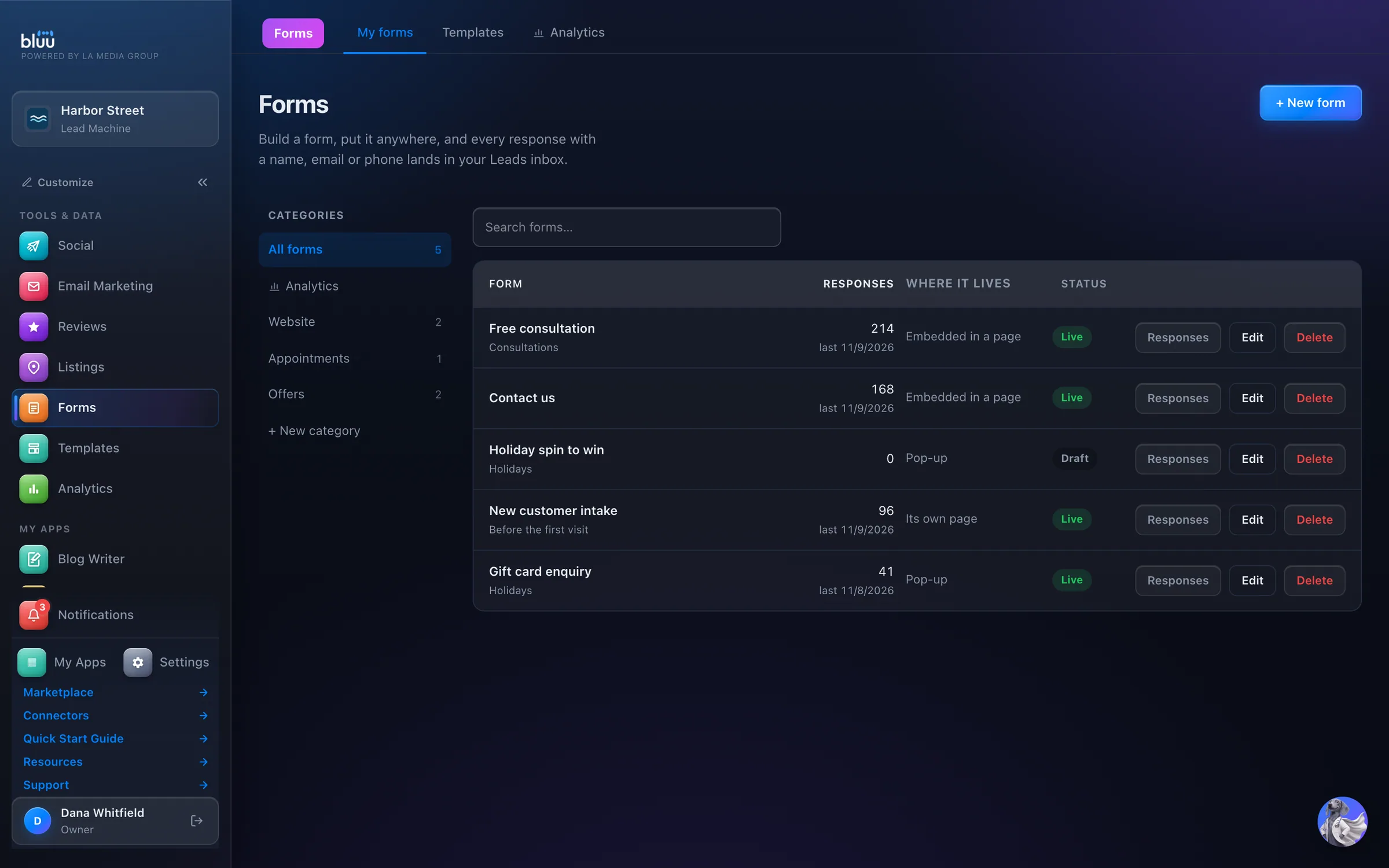
bluu.lamediagrp.com/forms
Forms in the Bluu dashboard, shown with Harbor Street, a sample business

Shown with Harbor Street, a sample business.

What Forms does

Forms that fill your CRM.

Forms builds the forms your business runs on: contact forms, quote requests, intake sheets, sign-ups, waivers and surveys. Click the fields you want, style it to match your site, and press Publish.

Every response with a name, email or phone becomes a lead and a contact by itself. Files they upload land on their record. There's nothing to connect and no export to remember.

Put a form wherever your customers are: inside a page, as a pop-up, on its own hosted page, behind a QR code, or printed for the front desk. Paste the snippet once, and later changes appear on your site when you save.

01

No retyping

Answers arrive as a lead and a contact, every field labelled, with their files attached.

02

Your site stays current

Change a form in the dashboard and every page it's embedded on changes with it.

03

Numbers you can trust

Views, button clicks, responses and conversion for every form, with how each one is counted written on the page.

At a glance

Everything it does, in plain words.

23 field types

Including file upload, signature, rating, date and time, and email consent.

Anywhere you need it

Embedded, as a pop-up, on its own hosted page, or behind a QR code.

Responses become customers

Every response with a name, email or phone becomes a lead and a contact.

Edit once, live everywhere

Paste the snippet once. Later changes appear on your site when you save.

Spam caught quietly

A hidden trap field stops bots without making people tick boxes.

Real file uploads

Stored privately, and they land on the contact.

How it works

From first look to second nature.

  1. 1

    Choose where it lives

    Press + New form and pick Embedded in a page, Pop-up, Its own page or Spin-to-win pop-up. Start from one of 43 ready-made forms, or a blank one.

  2. 2

    Build it

    Click fields to add them, move them with the arrows, and set colours, fonts and the button under Styles. The preview is the real form.

  3. 3

    Publish and share

    Press Publish, then Share for the Link, the Embed code, an iFrame, a QR code or a Print / PDF version.

  4. 4

    Watch responses arrive

    Each response shows under Responses, lands in Leads and Contacts, and tells your team.
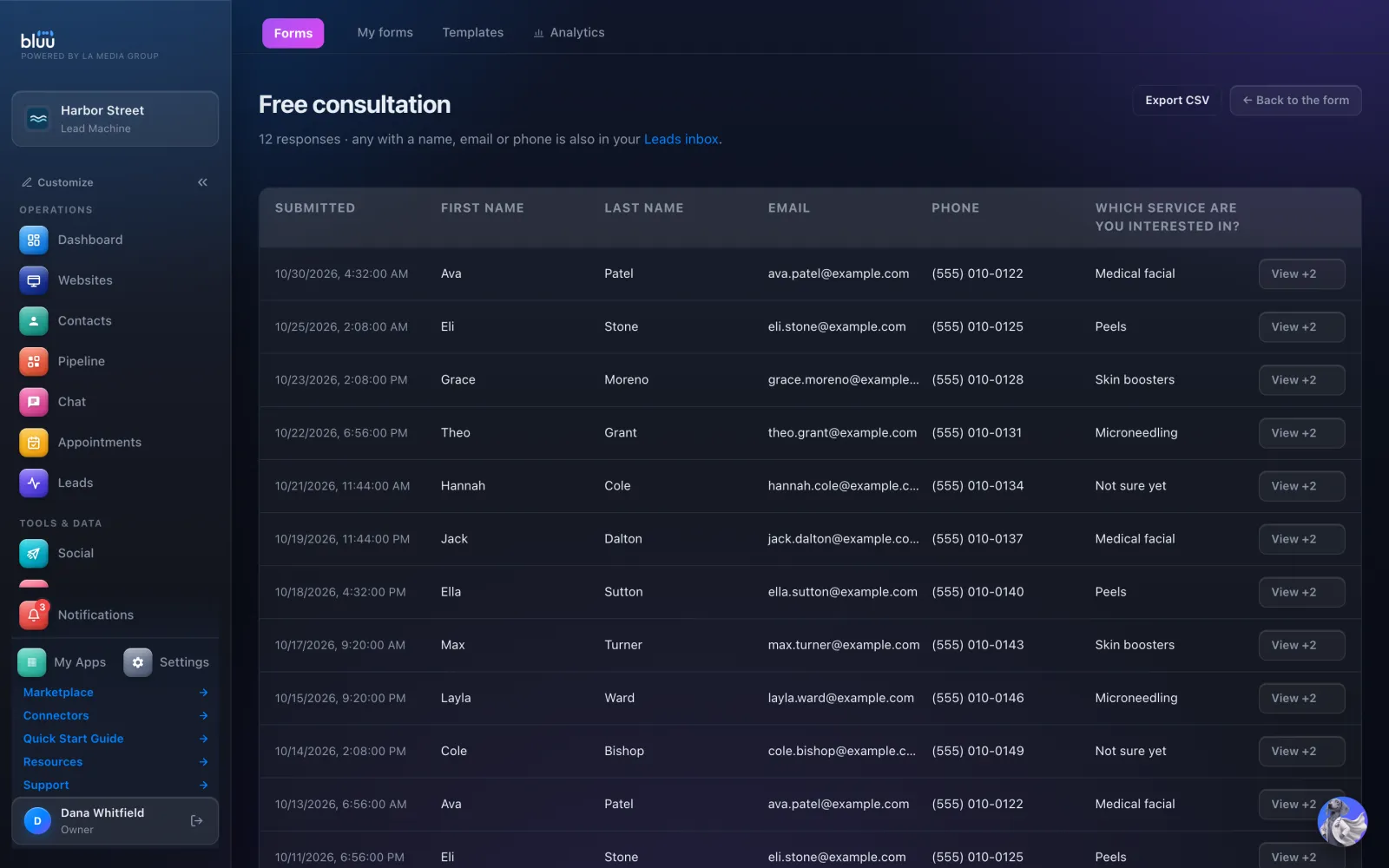
    Watch responses arrive
  5. 5

    See what works

    Analytics shows how often each form is seen, pressed and filled in, over the last 7, 30 or 90 days.

In depth

Every part of Forms.

Build anything

23 field types, and 43 ready-made forms in 12 categories.

  • Contact details, done right. First name, last name, email, phone, address, and an Email consent box with the right wording.
  • Advanced fields. Date, time, amount, website, file upload, links, star rating, signature and hidden values.
  • Start from a template. Contact us, Request a quote, New client intake, Job application, Event registration, Customer feedback and dozens more, ready to change.
  • Make it yours. A picture beside or above the form, your background and button colours, width, corners, borders and six fonts.
  • Save your own. Press Save as a template and start new forms from it, under Saved by you.
  • Forms with no questions. A promotion can be just a heading, text, a picture and a button that goes to a booking page, a link or your phone number.

Put it anywhere

One form, five ways to share it.

  • Embed or iFrame. Paste one line into your website. The iFrame version works on website builders that block scripts.
  • Pop-ups with rules. Show it on load, after a few seconds, once they scroll, or as they go to leave. Choose which pages, and the dates it runs.
  • Pop-ups that never clash. Two pop-ups can never show at the same time. Bluu refuses an overlap and tells you what to change.
  • Its own page and QR code. A hosted link for a text, an email or a social post, and a QR code as a PNG or a print-ready SVG.
  • Print / PDF. A clean black and white version for clipboards and front desks.
  • Thank you, your way. Show a thank-you message, or send people to your own thank-you page. The whole page moves, even when the form is embedded.

Every response, handled

Answers go where you work, not to an inbox nobody checks.

  • Leads and Contacts. A response with a name, email or phone becomes a lead tagged Website form, and an email or phone makes them a contact.
  • Files on the record. Uploads of up to 10 MB each are stored privately and appear in the contact's Files & Attachments.
  • Your team is told. Everyone with access to Leads hears about a new lead on the channels they choose. Add Also email addresses for anyone who doesn't log in.
  • Spam caught quietly. Block spam bots adds an invisible field that bots fill in and people never see.
  • Responses and CSV. See every answer and the page it was filled in on, and press Export CSV for a spreadsheet.
  • Mailchimp and Klaviyo. Send everyone who fills it in to your own Mailchimp audience or Klaviyo list, so your own emails go out to them.

Spin to win

A prize wheel you control, with the result decided on our server.

  • Every slice is yours. Name, colour, chance and code for 2 to 12 slices, plus a So close! slice that isn't a prize.
  • Decided on the server. The prize is picked on our side, so a visitor's browser never sees the odds or the codes.
  • One spin per email. Spin again with the same address and they see what they already won.
  • A different email for each prize. With Mailchimp connected, each slice adds its own tag, so every prize can start its own automation.

See more of it

The real screens.

Every response in one table, with Export CSV. Any with a name, email or phone is in your Leads inbox too.
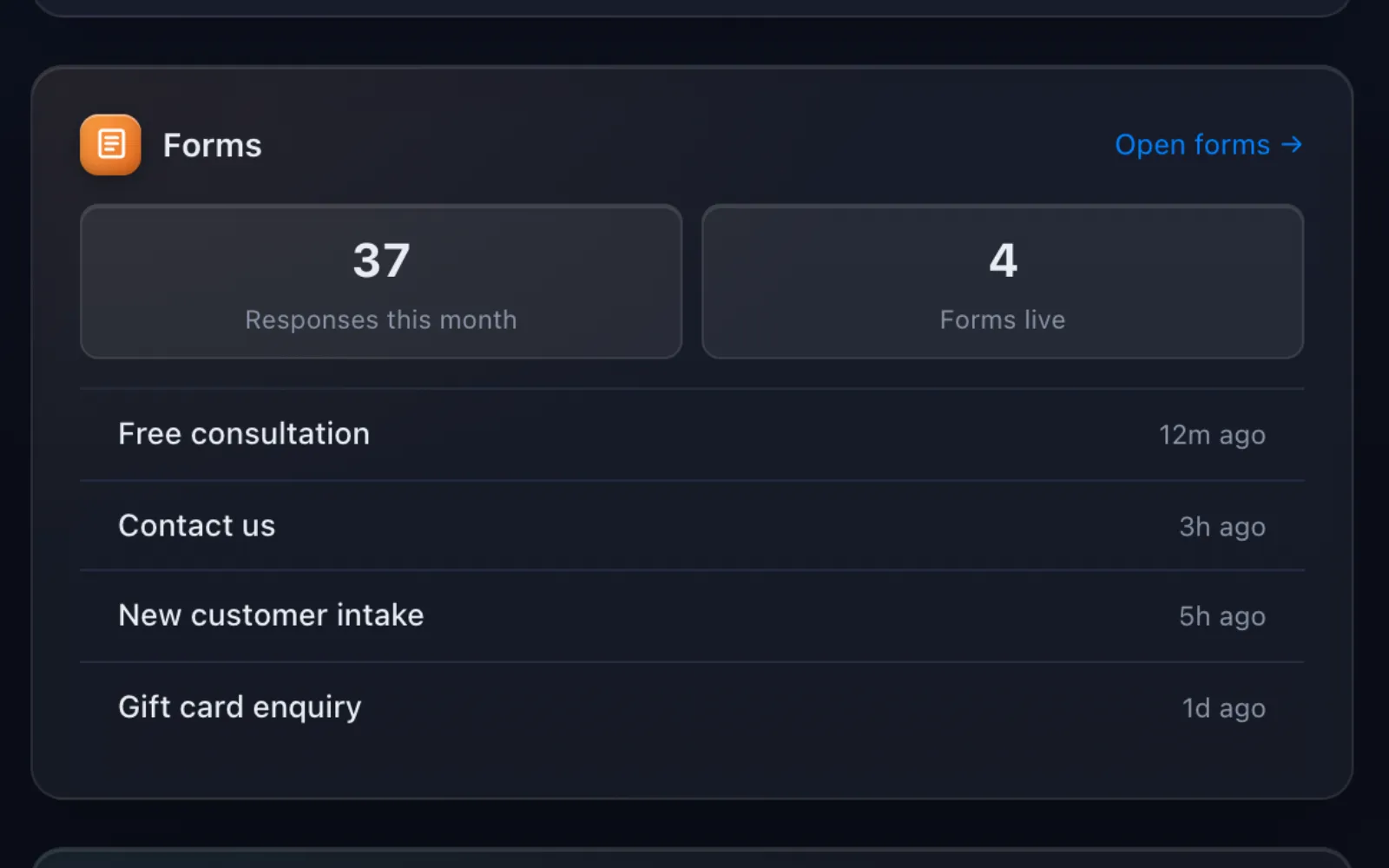
Responses this month, forms live and the latest responses, on your Dashboard.

It talks to the rest of Bluu

Forms hands its work to the others.

Forms
  • LeadsA response with a name, email or phone arrives as a lead tagged Website form, with every answer labelled.
  • ContactsThe person is matched or created as a contact, with their files and links in Files & Attachments.
  • Email MarketingResponses join your Email List and any lists you tick, and the Email consent box records their agreement.
  • EventsAny form can be an event's RSVP, and its responses schedule that event's reminders.
  • AppointmentsA form's button can go straight to any of your booking pages.
  • AnalyticsForm responses count as enquiries in Analytics, under Website form.

Questions

Asked, and answered.

Anything else? info@lamediagrp.com

Do I need a website?

No. Its own page gives any form a link and a QR code you can share anywhere.

If I edit a form, does my website update?

Yes. Paste the snippet once. When you save, your site shows the new version with nothing to paste again.

Does every response become a lead?

Every response with a name, email or phone does. One without any of those, like an anonymous survey, stays in Responses and alerts the people with access to Forms.

How do you stop spam?

Block spam bots is on by default. Bots fill in an invisible field, and nothing they send is saved.

Can a form take payment?

No. The Amount field records a figure, but it charges nobody.

Can responses go to Mailchimp or Klaviyo?

Yes. Connect it once under Leads > Sources, then choose the audience or list on the form's Email marketing tab.

Previous app ListingsRight details on 90+ directoriesNext app TemplatesWrite it once, use it everywhere

Your whole business,
in one place.

Start free for 7 days. Then $149 a month, locked in.

Start your free trial Book a call