
Skip to content
Powered by LA Media Group
  • Pricing
  • Websites
  • Book a call
Log inStart free for 7 days

Run the business

  • DashboardYour whole business on one screen
  • WebsitesYour site, built and run for you
  • ContactsEvery customer, one record each
  • PipelineEvery deal, and what happens next
  • ChatWebsite chat, email and texts in one thread
  • AppointmentsOnline booking that can't double book
  • LeadsEvery enquiry, one inbox

Grow and get found

  • SocialPost to every channel from one place
  • Email MarketingUpgradeCampaigns, automations and an AI manager
  • ReviewsGet more reviews, answer every one
  • ListingsUpgradeRight details on 90+ directories
  • FormsForms that fill your CRM
  • TemplatesWrite it once, use it everywhere
  • AnalyticsWhat's working, while it's happening

Marketplace

  • Blog WriterSEO-ready posts from a topic
  • Products & PackagesSell packages and memberships
  • EventsAn events calendar on your site
A business owner reading a website chat on her phone, from the Bluu filmSee all of it in 3:18The Bluu filmSee every app
Bluu AI Trained on your business, not the internet's

AI that does the work

AI Chat AIAnswers your website day and night, captures every lead and books the appointment.Bluu Assistant AIYour digital doctor on every screen. Ask how to do anything, in plain English.Email Marketing AIAsk for a campaign, a list or an automation. It builds the draft for your yes.Social AIWrites posts for every channel from your Business Profile. You approve every one.Blog Writer AIA finished, SEO-ready post from a topic or a service name.

Powered by LA Media Group

Want us to grow it for you?

The agency behind Bluu runs your ads, SEO, website and email, and every result lands in your dashboard, live.

All marketing services Book a call with our team
Facebook & Instagram adsReach the people who didn't know they wanted it, before they start lookingGoogle AdsBe the first thing they see, the moment they need youLocal SEOGet found by the people already looking for youWebsitesA website that brings you work, not complimentsEmail & SMSThe cheapest customer is the one you already hadContentAnswer the questions before they call anyone, and get quoted by Google and AI answers

Run the business

DashboardWebsitesContactsPipelineChatAppointmentsLeads

Grow and get found

SocialEmail MarketingReviewsListingsFormsTemplatesAnalytics

Marketplace

Blog WriterProducts & PackagesEvents
Marketing by LA Media GroupPricingWebsitesBook a callLog in
Start your free 7 days

Your whole business.
One login.

Start free for 7 days Book a call

Questions? info@lamediagrp.com. We answer by email and on booked calls.

Run the business

  • Dashboard
  • Websites
  • Contacts
  • Pipeline
  • Chat
  • Appointments
  • Leads

Grow and get found

  • Social
  • Email Marketing
  • Reviews
  • Listings
  • Forms
  • Templates
  • Analytics

Marketplace

  • Blog Writer
  • Products & Packages
  • Events

Bluu

  • Every app
  • Pricing
  • Websites
  • Book a call
  • Log in
  • Start free
  • Terms of Service
  • Privacy Policy
  • Launch offer terms
  • Cancellation policy
  • Refund policy
  • Acceptable use
  • Messaging terms
  • AI terms
  • Website services terms
  • Data processing
  • Cookies
Powered by LA Media Group© 2026 LA Media Group LLC. Bluu is made by LA Media Group.Davie, Florida · info@lamediagrp.com
From$149/monthStart freeSee pricingPricing

Apps / Run the business

Let them book themselves, without the phone tag.

Your own booking page, as a link you can send or embedded in your website. It knows your real hours, holds the slot while they pay, creates the contact, goes on your Google Calendar, and sends the reminders you choose.

Start free for 7 days Book a call

Appointments is included in Bluu, $149/month with every standard app.
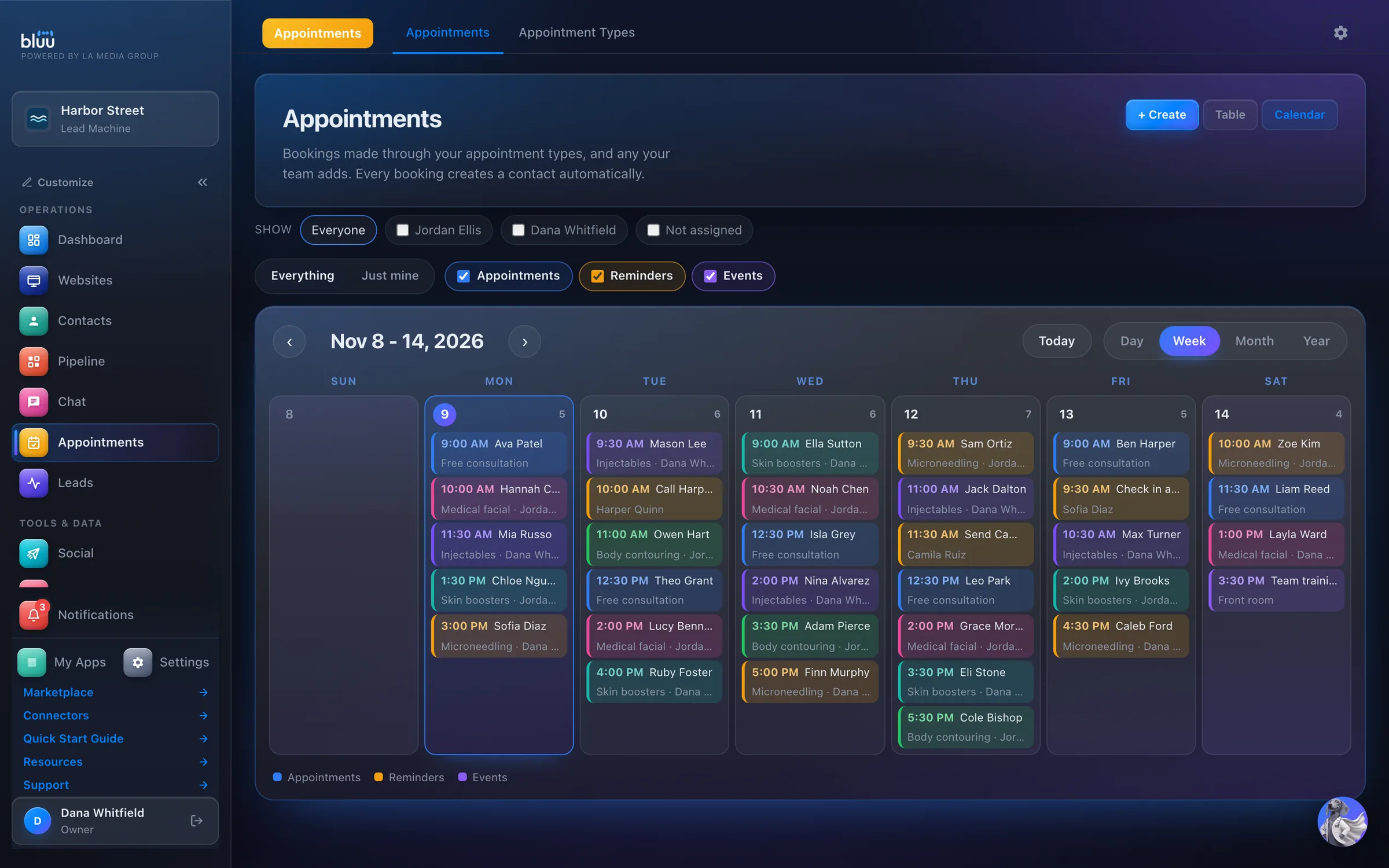
bluu.lamediagrp.com/appointments
Appointments in the Bluu dashboard, shown with Harbor Street, a sample business

Shown with Harbor Street, a sample business.

What Appointments does

Online booking that can't double book.

Appointments gives every service you offer its own booking page. Send it as a link, embed it on your website or print its QR code. Customers pick a time you're actually available and book it themselves, day or night.

Each booking does the whole job. It finds or creates the customer's contact, goes on your Google Calendar once you connect it, emails them a confirmation, schedules the reminders you chose and alerts your team.

Your team can book people in too, at any time, from + Create. Every booking sits in one table and one calendar, in your business's own time zone.

01

No double bookings

Hours, buffers, closures and existing bookings are checked again the moment someone books. If two people pick the same slot, only one gets it.

02

Reminders that go out

Up to three reminders for the customer and three for your team, by email, text or both, at the times you choose.

03

Nothing retyped

Every booking becomes a contact with their answers attached, so your team walks in knowing what the customer told you.

At a glance

Everything it does, in plain words.

Your own booking page

A link, an embed for your website and a QR code. Built for the phone.

It can't double book

Hours, buffers, closed dates and existing bookings are checked again at the moment someone books.

Deposits to your account

Take a deposit through your own Stripe account, with no cut taken.

Reminders that go out

Up to three per appointment type, by email, text or both, at the times you choose.

Google Calendar, both ways

Bookings write to your calendar, and anything busy there blocks the slot.

Every booking is a customer

It becomes a contact, one click from Pipeline, and the customer is told if it moves.

How it works

From first look to second nature.

  1. 1

    Create a type

    Under Appointment Types, press + New Type. Set the name, length, location, any buffer between bookings, and the days and hours it can be booked.

  2. 2

    Decide what happens

    Add your own intake questions, choose who customers can book with, and add the reminders for the customer and for your team.

  3. 3

    Share it

    Press Copy link, or open Share & embed for the website embed code and a QR code you can download for print.

  4. 4

    They book

    The customer picks a date and a time and presses Confirm booking. The confirmation goes out, the contact is created or updated, and the booking lands on their card.
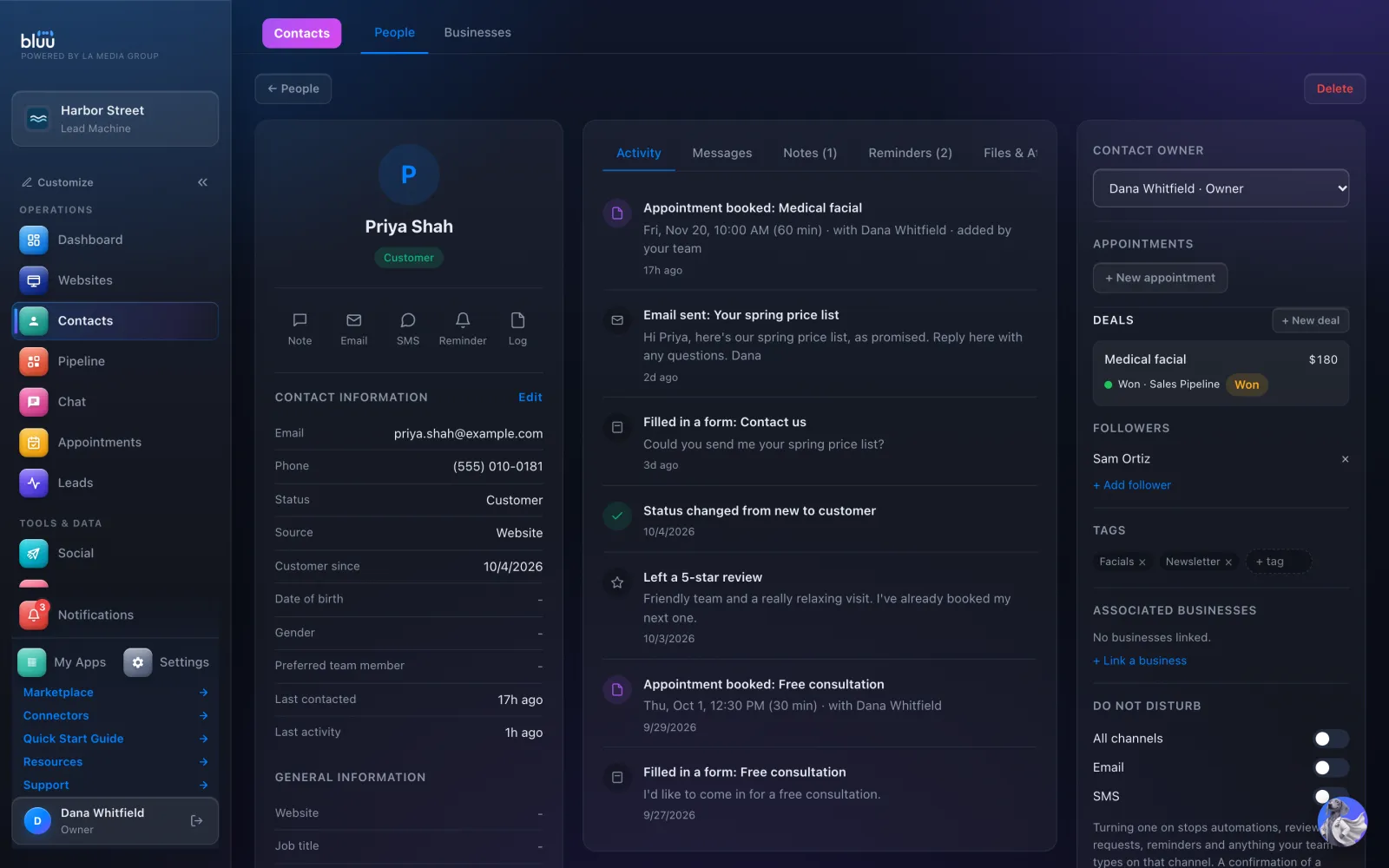
    They book
  5. 5

    Run the day

    Open any booking to reschedule it, hand it to someone else, mark it Completed or No-show, or add it to Pipeline. The customer is emailed when it moves.
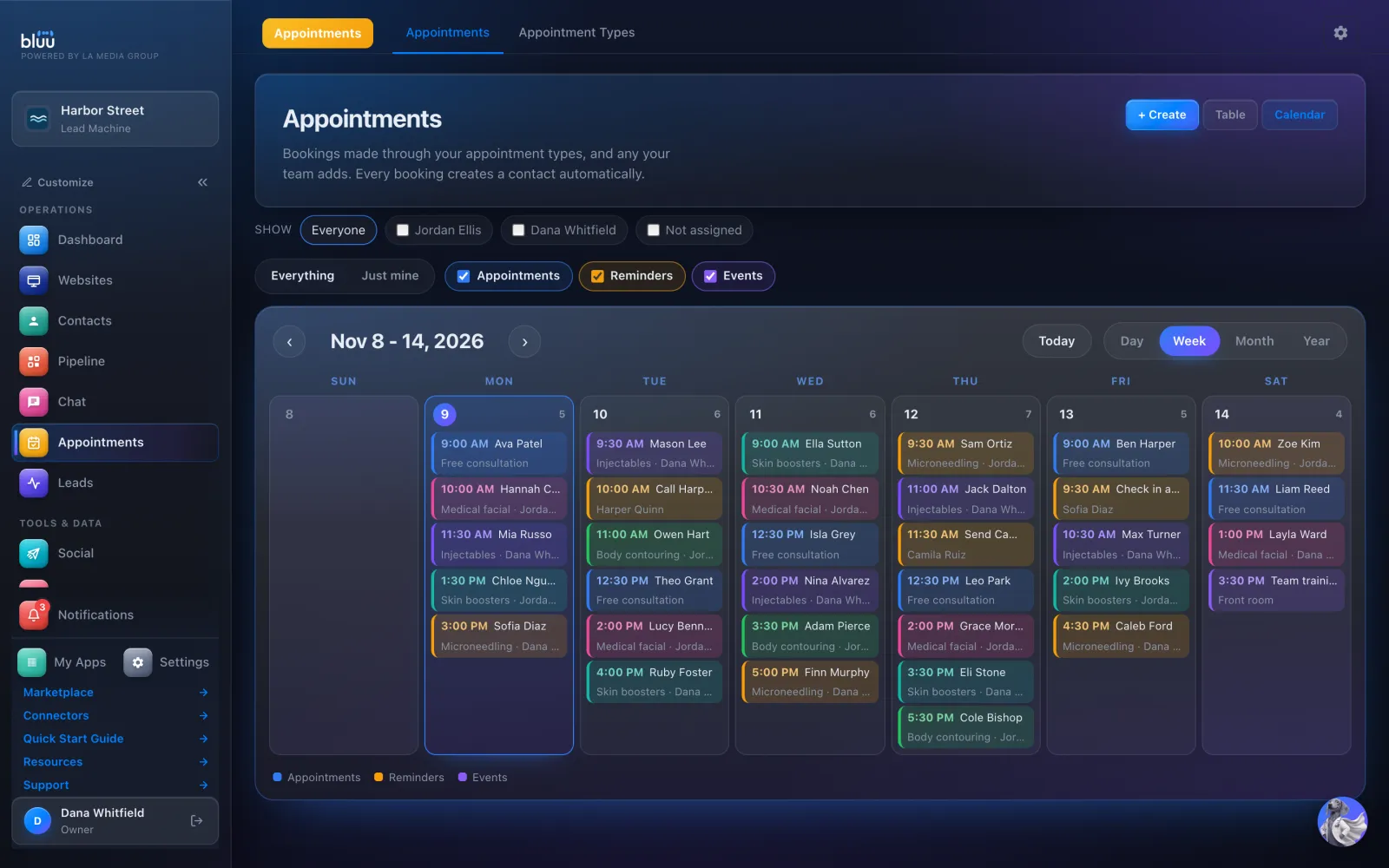
    Run the day

In depth

Every part of Appointments.

Your booking page

One page for each service, built for the phone.

  • Link, embed and QR code. Each appointment type has its own link, an embed code for your website styled with your own accent color, and a QR code for flyers and signage.
  • Choose who to see. Add the people customers can choose between. The page asks who they'd like to see, then shows that person's times.
  • In person or online. Choose In person, Virtual or a custom location. Virtual types get a Google Meet link for each booking, or your own Zoom or Teams room.
  • Your own questions. Name, email and phone are always asked. Add your own questions as text, dropdowns, checkboxes, dates and more.
  • Take payment up front. Charge for an appointment or take a deposit through your own connected payment account, with no cut taken. The time is held while they pay, and nothing is confirmed until the money lands.
  • Count it as a conversion. Send customers to your own thank-you page after they book, so Google Ads, Google Analytics and the Facebook pixel count the booking.

Only times you're available

Your real availability, checked again at the moment of booking.

  • Hours that fit. Set the days and hours for each appointment type, or let each person keep their own hours.
  • Breathing room. A buffer keeps time clear before and after every booking, and hides times too close to now.
  • Holidays and closures. Close a day, a range or part of a day, for the whole business or one person. Your weekly hours stay exactly as they are.
  • Busy on Google, busy here. Switch on the busy setting for a connected Google Calendar, and anything already in it blocks the slot.
  • Hours for each location. With more than one location, set when each one takes bookings, so nobody is booked into a building that's closed.

After they book

The confirmation, the calendar and the reminders, handled for you.

  • A confirmation every time. The customer is emailed the time, the place and a join button for video calls. If they reply, it lands in Chat.
  • Reminders you choose. Anywhere from a month before to five minutes before, by email, text or both. A new type starts with none, so you decide exactly what goes out.
  • On the right calendar. Each booking goes on your business calendar, or on the calendar of the person it's with, with the customer as a guest.
  • Moves and cancellations. Press Reschedule and the calendar event moves, the reminders are rebuilt and the customer is emailed the new time. Cancel one and they're told.
  • Your team in the loop. New bookings, cancellations and no-shows alert your team by email, in the dashboard or on their phone, as each person chooses.

Your team's diary

One table and one calendar for everyone's bookings.

  • Table or calendar. Upcoming, past or every booking in a table, or a calendar by day, week, month or year.
  • Whose diary. Tick one or more team members to see their bookings side by side, or switch to Just mine.
  • Book anyone in. + Create books a customer at any time, even outside your published hours, and double bookings are still refused. A new person becomes a contact as you book them.
  • One-offs welcome. Book something that isn't one of your appointment types, with its own name and length, without adding it to your booking pages.
  • Reminders and events too. The same calendar shows follow-up reminders and team events, in your business's own time zone.

See more of it

The real screens.

A customer's contact card, with each booking on their Activity and + New appointment one click away.
The whole team's week, with bookings, reminders and events on one calendar.

It talks to the rest of Bluu

Appointments hands its work to the others.

Appointments
  • ContactsEvery booking finds or creates the customer's contact and writes it on their Activity, with everything they told you.
  • LeadsA booking from your page files a lead marked Online booking, with every answer the customer gave.
  • PipelinePress + Deal on any booking to put it on your board, already named after the appointment type.
  • ChatReplies to a confirmation land in Chat, and with AI Chat your website chat checks your real open times and books the appointment itself.
  • Email MarketingAn email automation can start when someone books, completes an appointment, cancels or doesn't show up.

Questions

Asked, and answered.

Anything else? info@lamediagrp.com

Does it work with my Google Calendar?

Yes. Connect Google in Appointments Settings and every booking goes on your calendar. Switch on the busy setting and anything already in that calendar blocks the slot. Changes you make in Google aren't copied back.

Can I take a deposit?

Yes. Connect your own payment account under Settings > Collect Payments, then switch on Charge for this appointment on a type. The money goes straight to you. Canceling doesn't refund it automatically: refunds are your call, made in your own payment account.

Do reminders cost anything?

Confirmation and reminder emails are included. Text reminders are paid from your prepaid balance and go out from your business phone number.

Can I book someone in myself?

Yes. Press + Create, then Appointment, to book a customer who calls or walks in, at any time you like. Double bookings are still refused, and the customer still gets their confirmation.

Can customers move their own appointment?

Their confirmation asks them to reply to the email. The reply lands in Chat, and your team moves the booking with Reschedule, which emails them the new time.

Do I need Google for video appointments?

No. Choose a Google Meet link for each booking, or paste your own Zoom, Teams or other meeting room and everyone who books gets it.

Previous app ChatWebsite chat, email and texts in one threadNext app LeadsEvery enquiry, one inbox

Your whole business,
in one place.

Start free for 7 days. Then $149 a month, locked in.

Start your free trial Book a call