Skip to content
Powered by LA Media Group
  • Pricing
  • Websites
  • Book a call
Log inStart free for 7 days

Run the business

  • DashboardYour whole business on one screen
  • WebsitesYour site, built and run for you
  • ContactsEvery customer, one record each
  • PipelineEvery deal, and what happens next
  • ChatWebsite chat, email and texts in one thread
  • AppointmentsOnline booking that can't double book
  • LeadsEvery enquiry, one inbox

Grow and get found

  • SocialPost to every channel from one place
  • Email MarketingUpgradeCampaigns, automations and an AI manager
  • ReviewsGet more reviews, answer every one
  • ListingsUpgradeRight details on 90+ directories
  • FormsForms that fill your CRM
  • TemplatesWrite it once, use it everywhere
  • AnalyticsWhat's working, while it's happening

Marketplace

  • Blog WriterSEO-ready posts from a topic
  • Products & PackagesSell packages and memberships
  • EventsAn events calendar on your site
A business owner reading a website chat on her phone, from the Bluu filmSee all of it in 3:18The Bluu filmSee every app
Bluu AI Trained on your business, not the internet's

AI that does the work

AI Chat AIAnswers your website day and night, captures every lead and books the appointment.Bluu Assistant AIYour digital doctor on every screen. Ask how to do anything, in plain English.Email Marketing AIAsk for a campaign, a list or an automation. It builds the draft for your yes.Social AIWrites posts for every channel from your Business Profile. You approve every one.Blog Writer AIA finished, SEO-ready post from a topic or a service name.

Powered by LA Media Group

Want us to grow it for you?

The agency behind Bluu runs your ads, SEO, website and email, and every result lands in your dashboard, live.

All marketing services Book a call with our team
Facebook & Instagram adsReach the people who didn't know they wanted it, before they start lookingGoogle AdsBe the first thing they see, the moment they need youLocal SEOGet found by the people already looking for youWebsitesA website that brings you work, not complimentsEmail & SMSThe cheapest customer is the one you already hadContentAnswer the questions before they call anyone, and get quoted by Google and AI answers

Run the business

DashboardWebsitesContactsPipelineChatAppointmentsLeads

Grow and get found

SocialEmail MarketingReviewsListingsFormsTemplatesAnalytics

Marketplace

Blog WriterProducts & PackagesEvents
Marketing by LA Media GroupPricingWebsitesBook a callLog in
Start your free 7 days

Your whole business.
One login.

Start free for 7 days Book a call

Questions? info@lamediagrp.com. We answer by email and on booked calls.

Run the business

  • Dashboard
  • Websites
  • Contacts
  • Pipeline
  • Chat
  • Appointments
  • Leads

Grow and get found

  • Social
  • Email Marketing
  • Reviews
  • Listings
  • Forms
  • Templates
  • Analytics

Marketplace

  • Blog Writer
  • Products & Packages
  • Events

Bluu

  • Every app
  • Pricing
  • Websites
  • Book a call
  • Log in
  • Start free
  • Terms of Service
  • Privacy Policy
  • Launch offer terms
  • Cancellation policy
  • Refund policy
  • Acceptable use
  • Messaging terms
  • AI terms
  • Website services terms
  • Data processing
  • Cookies
Powered by LA Media Group© 2026 LA Media Group LLC. Bluu is made by LA Media Group.Davie, Florida · info@lamediagrp.com
From$149/monthStart freeSee pricingPricing

Apps / Grow and get found

Get more reviews, and answer every one.

Your Google and Facebook reviews in one inbox, a one-tap way to ask happy customers for one, and replies that go out publicly without anybody logging into Google.

Start free for 7 days Book a call

Reviews is included in Bluu, $149/month with every standard app.
bluu.lamediagrp.com/reviews
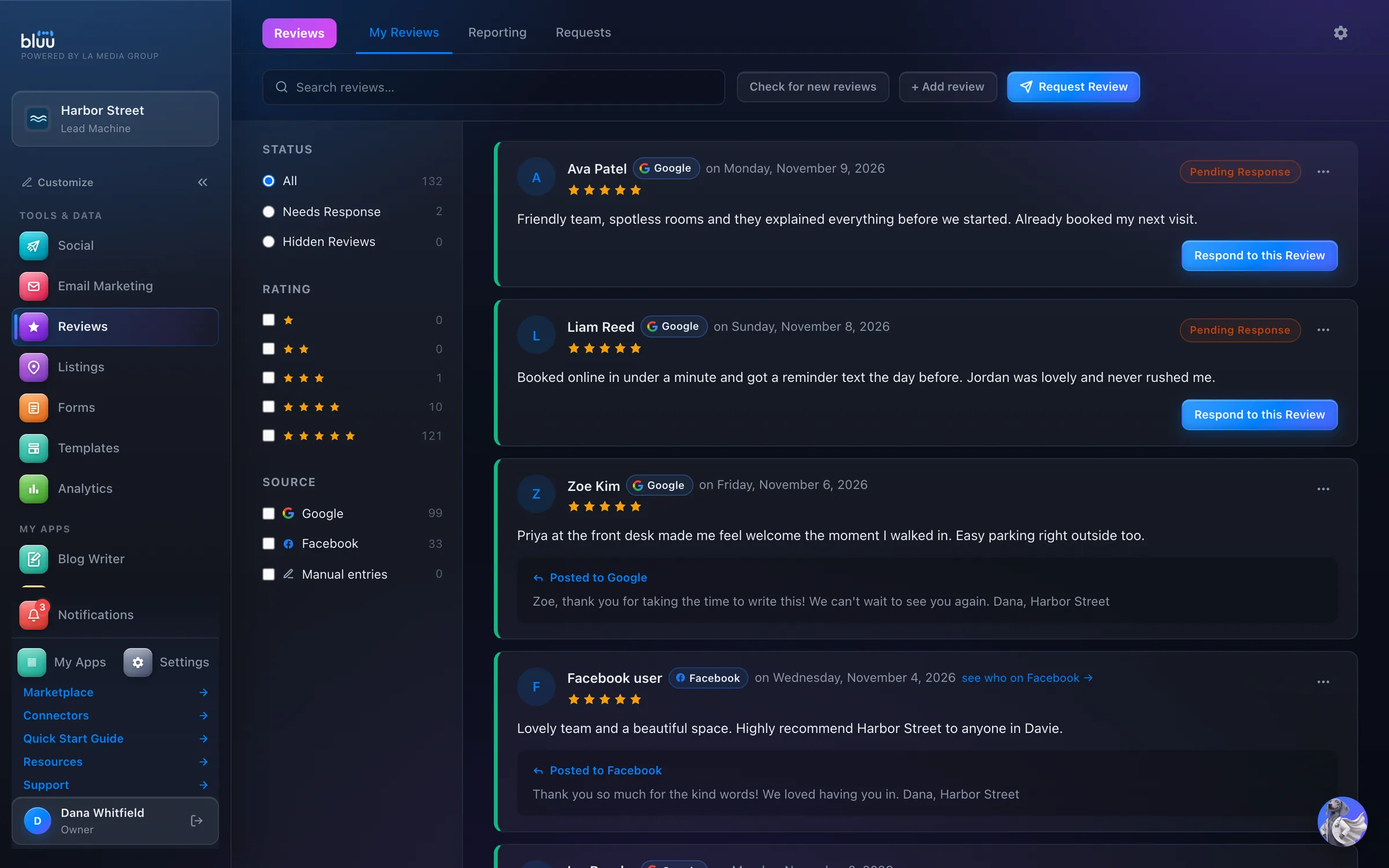
Reviews in the Bluu dashboard, shown with Harbor Street, a sample business

Shown with Harbor Street, a sample business.

What Reviews does

Get more reviews, answer every one.

Reviews brings your Google and Facebook reviews into one inbox. Every card names where the review came from, shows the stars and the words, and says whether it still needs a reply.

Answer from the card and your reply posts publicly on Google or Facebook, with nobody needing the Google login. If a reply can't post, the card says Saved, not yet on Google, with the reason and a Try posting again button.

Asking for reviews is just as simple. Send a request by email, text or both, or print a QR code for the counter. Every request gets its own link, and the Requests tab shows who opened it and who pressed through to review.

01

Every review answered

One inbox, filtered to Needs Response, so nothing sits for weeks because nobody had the login.

02

More happy customers asked

A link, a QR code, an email or a text. Asking takes a few fields, not a hunt for the right link.

03

Bad news travels fast

A review of three stars or lower gets a stronger alert, by email, in the dashboard and on your phone.

At a glance

Everything it does, in plain words.

Google and Facebook, one inbox

Checked twice a day, with alerts to your team.

Reply in public, from here

Your reply posts on Google or Facebook from the dashboard. If one fails, the card says so.

Ask the right way

Request a review by text, email, link or QR code.

Smart auto-replies

From your own templates, only for reviews after you connect, never old ones.

A person for the hard ones

Anything under four stars waits for a human, never a template.

Show them off

A live grid of your reviews for your own website.

How it works

From first look to second nature.

  1. 1

    Connect your listings

    Open the gear for Reviews settings and press Connect beside Google Business Profile or Facebook Page. Sign in, choose the listing, and the reviews already on it come in straight away.

  2. 2

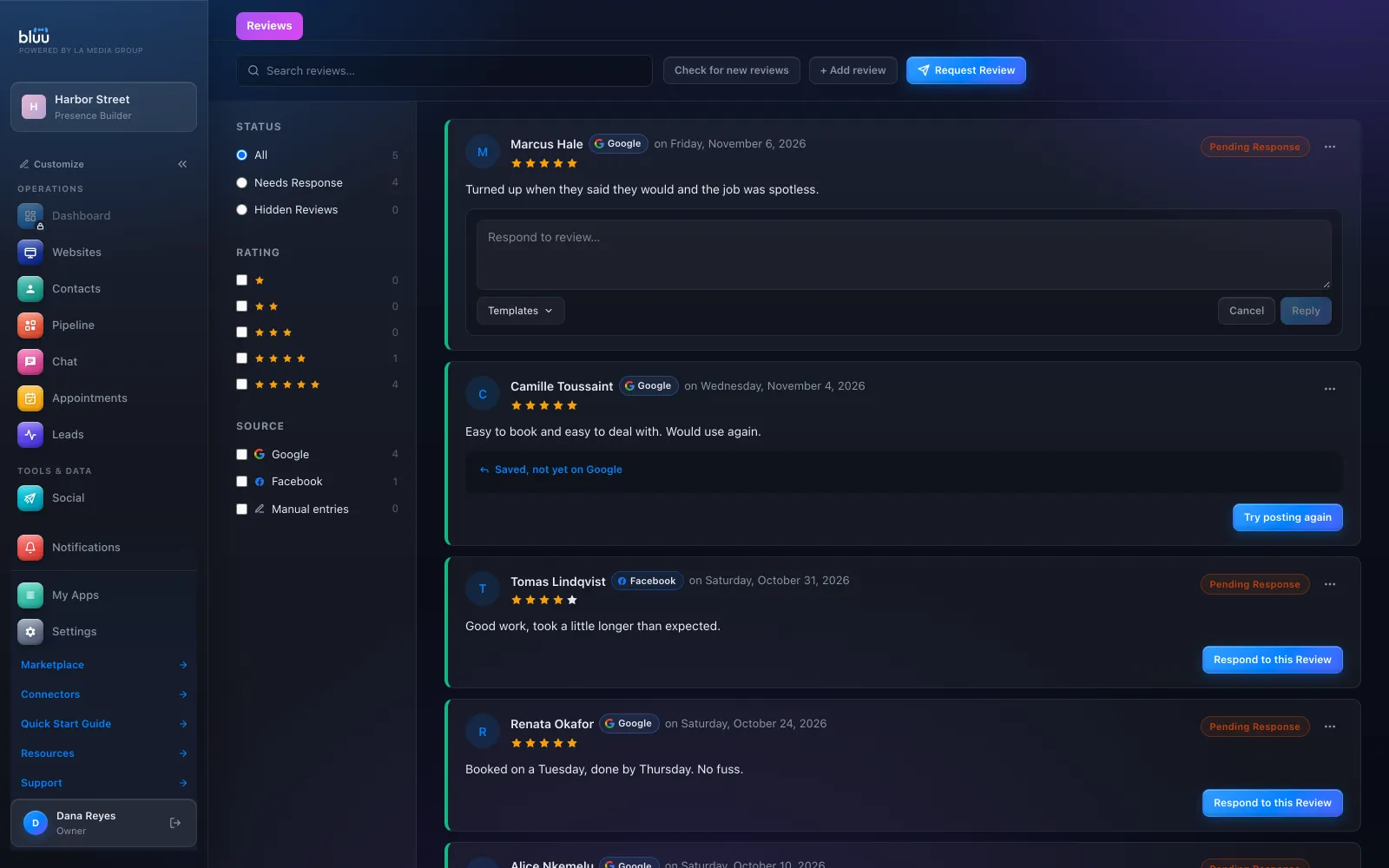
    Answer what's waiting

    Choose Needs Response, press Respond to this Review and pick a reply from Templates with their name already filled in. Press Reply and the card shows Posted to Google.
    Answer what's waiting
  3. 3

    Ask for more

    Press Request Review and choose Link / QR, Email, SMS or Email + SMS. Download the QR code as a PNG, or as an SVG for print.

  4. 4

    Let the good ones answer themselves

    Turn on the auto-response engine and add a rule: which star ratings, which source, which template. Anything under four stars still waits for a person.

  5. 5

    Show them off

    Create a website widget, choose the source, the minimum rating and how many to show, then copy the code onto your site.

In depth

Every part of Reviews.

One inbox for every review

Google and Facebook together, with the platform named on every card.

  • Checked twice a day. New reviews come in twice a day, and Check for new reviews brings them in whenever you like. It always tells you what it found.
  • Filters that add up. Status, Rating and Source in the left rail, each with a count, plus a search across names and review text.
  • Replies you already wrote come too. Replies already posted on Google are matched to their reviews, so your older reviews don't all show Pending Response.
  • Add one by hand. Got a review some other way? + Add review keeps track of it, and if the email matches a contact it shows on their activity.
  • Hide inside Bluu. Hide review takes a review out of your list, your reporting and your website widget. It doesn't touch Google or Facebook.
  • Honest about Facebook. Facebook doesn't share reviewer names with apps, so the card says Facebook user, with a link to see who on Facebook.

Replies that really post

Your answer goes out in public, straight from the dashboard.

  • Three honest states. Posted to Google, Saved, not yet on Google with the reason, or Your reply on a review you added by hand. You always know where it stands.
  • Templates in the reply box. Ready-made replies to a good, a poor and a mixed review sit in your Templates library, and drop into the box with the reviewer's name filled in.
  • Auto-replies by rating and source. Rules answer five star, four and five star, or four star reviews, from any source or just one. The highest priority match wins.
  • Never on old reviews. Connecting pulls in your history quietly. Alerts and automatic replies only fire for reviews that arrive after you connect.
  • A person for the hard ones. An automatic reply never posts on a review under four stars. Those wait for you.

Asking for reviews

Four ways to ask, and a record of every request.

  • Your own landing page. Every request opens a page with your logo and colour, and buttons to review you on Google or Facebook.
  • Print-ready QR code. Download PNG, or Download SVG (print-safe) for a counter card, a receipt or a window.
  • Your words. Change the email subject, headline and message, the text wording, and the landing page headline under Reviews settings.
  • The right branch. With more than one location, choose which one they visited and the request goes to that branch's Google listing.
  • A record of every ask. The Requests tab shows each one as Sent, Opened, Clicked to review or Failed, with the reason when something didn't go.
  • Respects their choices. Someone on Do Not Disturb for email, or opted out of texts, isn't sent anything.

Reporting and your website

See how you're doing, and show it off.

  • Review summary. Reviews in the last 30 days, the split from five stars to one, and your average rating.
  • Where they come from. Top review sources, your best and worst month, and reviews over the last 12 months.
  • A live widget for your site. Choose all sources or one, a minimum rating, how many to show, and light or dark. New reviews appear on it by themselves.
  • An honest average. When the widget leaves some reviews out, its line says the average only covers the reviews shown.

See more of it

The real screens.

Reply right on the card. Pick a template and it fills in their name.
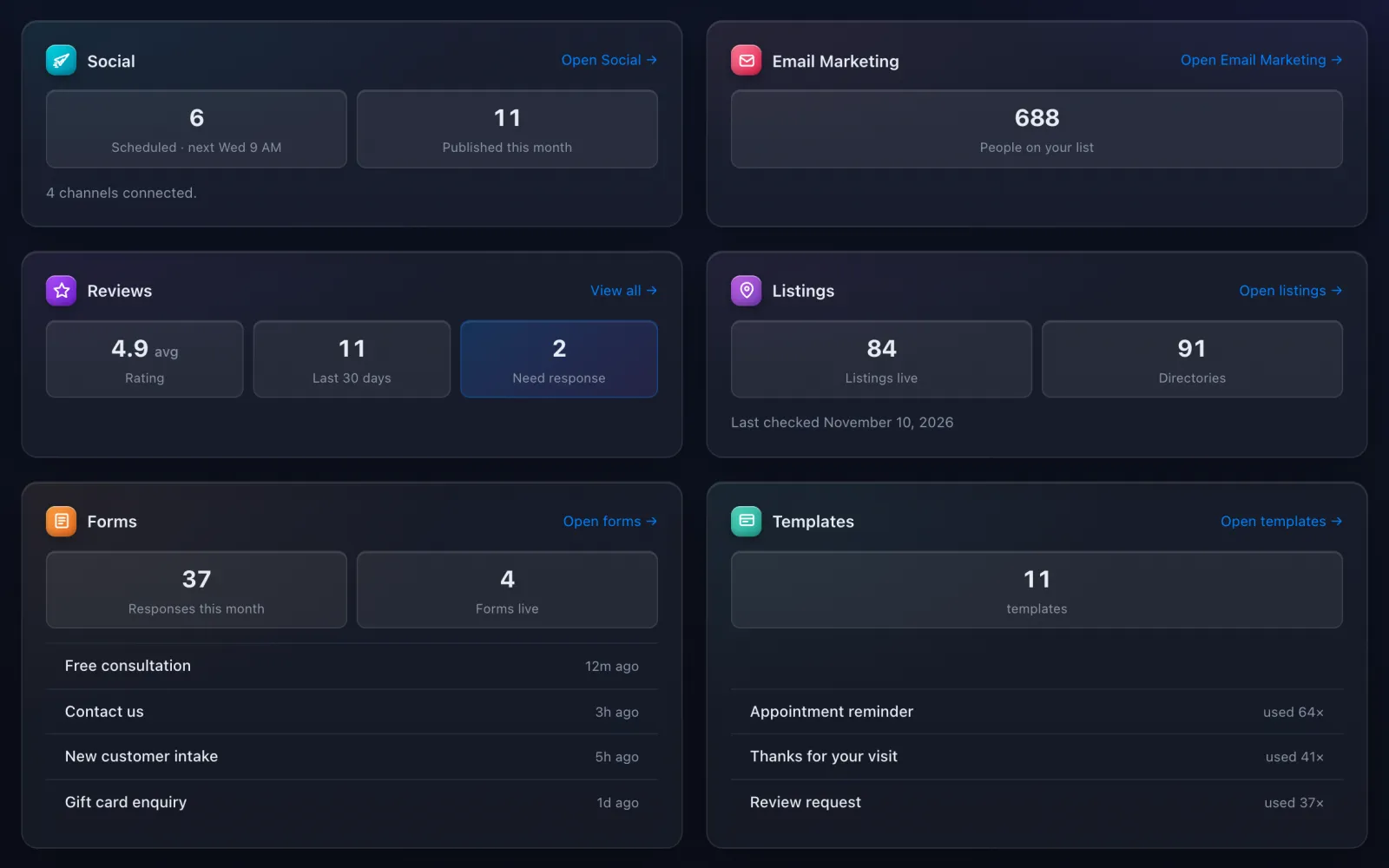
Your average rating, reviews in the last 30 days and how many need a reply, on your Dashboard.

It talks to the rest of Bluu

Reviews hands its work to the others.

Reviews
  • TemplatesReview reply templates fill the reply box and power your automatic replies.
  • ContactsA request to a known email or number lands on that contact's conversation, and a review added by hand with their email shows on their activity.
  • Email MarketingThe After an appointment automation thanks customers and asks for a review, with a Leave a review button that goes to your listing.
  • AnalyticsReviews received and your average rating sit beside your enquiries in Analytics.
  • DashboardThe Reviews tile shows your rating, the last 30 days and how many need a reply.

Questions

Asked, and answered.

Anything else? info@lamediagrp.com

Do I need my Google login to reply?

Only once, to connect. After that anyone whose role can reply answers from the dashboard, and the reply posts publicly on Google or Facebook.

Will connecting reply to all my old reviews?

No. Your history comes in quietly. Alerts and automatic replies only fire for reviews that arrive after you connect.

Can it answer bad reviews automatically?

No, on purpose. Automatic replies only go to four and five star reviews. Anything lower waits for a person, and your team gets a stronger alert.

Can Bluu remove a bad review?

No. Hide review only hides it inside Bluu and your website widget. Google and Facebook decide what stays on their sites.

Does it screen out unhappy customers before they review?

No. The request page sends everyone straight to Google or Facebook. Filtering people out is against both platforms' rules.

What do review requests cost?

Email, link and QR code requests are included. A text request is charged per text from your prepaid balance and needs a business phone number.

Previous app Email MarketingCampaigns, automations and an AI managerNext app ListingsRight details on 90+ directories

Your whole business,
in one place.

Start free for 7 days. Then $149 a month, locked in.

Start your free trial Book a call